
Quick Takeaways
If you want AI to improve business workflows in 2026, focus on these first:
- Start With One Clear Workflow
- Clean Up The Data Behind It
- Choose A Tool That Fits Your Existing Stack
- Run A Small Pilot Before Expanding
- Measure Time Saved, Cost Reduced, Or Errors Removed
- Keep Human Review In The Loop Where Judgment Matters
Why AI Workflow Integration Looks Different In 2026
AI workflow integration in 2026 is less about trying random tools and more about fitting AI into real operations. Most businesses are no longer asking whether they should use AI. They are asking which workflows are worth improving, which tools fit their current systems, and how to avoid buying software that creates more friction than value.
That shift is real. According to the Writer’s 2026 enterprise AI adoption survey, AI usage is widespread, but many organizations still struggle with rollout, ROI, and governance. That is why the right starting point is not hype. It is workflow clarity.
If you want the broader context first, it helps to understand why AI matters in 2026 and how AI is shaping business strategy.
(This visual was created with AI assistance for illustrative and educational purposes.)
1. Start With One Workflow, Not A Full Rebuild
The fastest way to waste time with AI is to treat it like a full company transformation from day one.
A better place to start is one workflow that is:
• Repetitive
• Slow
• High-volume
• Low-risk
• Easy to measure
Good starting points include:
• Support ticket routing
• Meeting summaries
• Lead qualification
• Invoice or PDF data extraction
• Internal reporting
• FAQ automation
A sales team losing hours on lead qualification has a very different AI need than a support team drowning in repetitive tickets or an operations team stuck building the same reports every week. The workflow has to come first. The tool comes after that.
2. Clean Up Your Data Before You Add Automation
AI does not fix messy systems. It usually makes messy systems faster.
Before integrating AI into any workflow, ask:
- Where Does The Data Live?
- Is It Centralized Or Scattered?
- Are The Fields Structured Consistently?
- Can The Team Trust The Source Data?
- Are Permissions Clear?
If your CRM is inconsistent, your support tags are unreliable, or your internal documentation is spread across too many tools, output quality will drop fast. This matters even more in workflows like lead prioritization, where weak data directly weakens the result. That is one reason tools such as HubSpot’s lead scoring are only useful when the underlying data is clean enough to support them.
3. Choose Tools That Fit The Stack You Already Use
The right AI tool is not the one with the best demo. It is the one that fits the systems your team already depends on.
That means asking:
- Does It Connect To Our CRM?
- Does It Work With Docs, Email, Support, Or Task Tools?
- Can The Team Use It Without Heavy Technical Overhead?
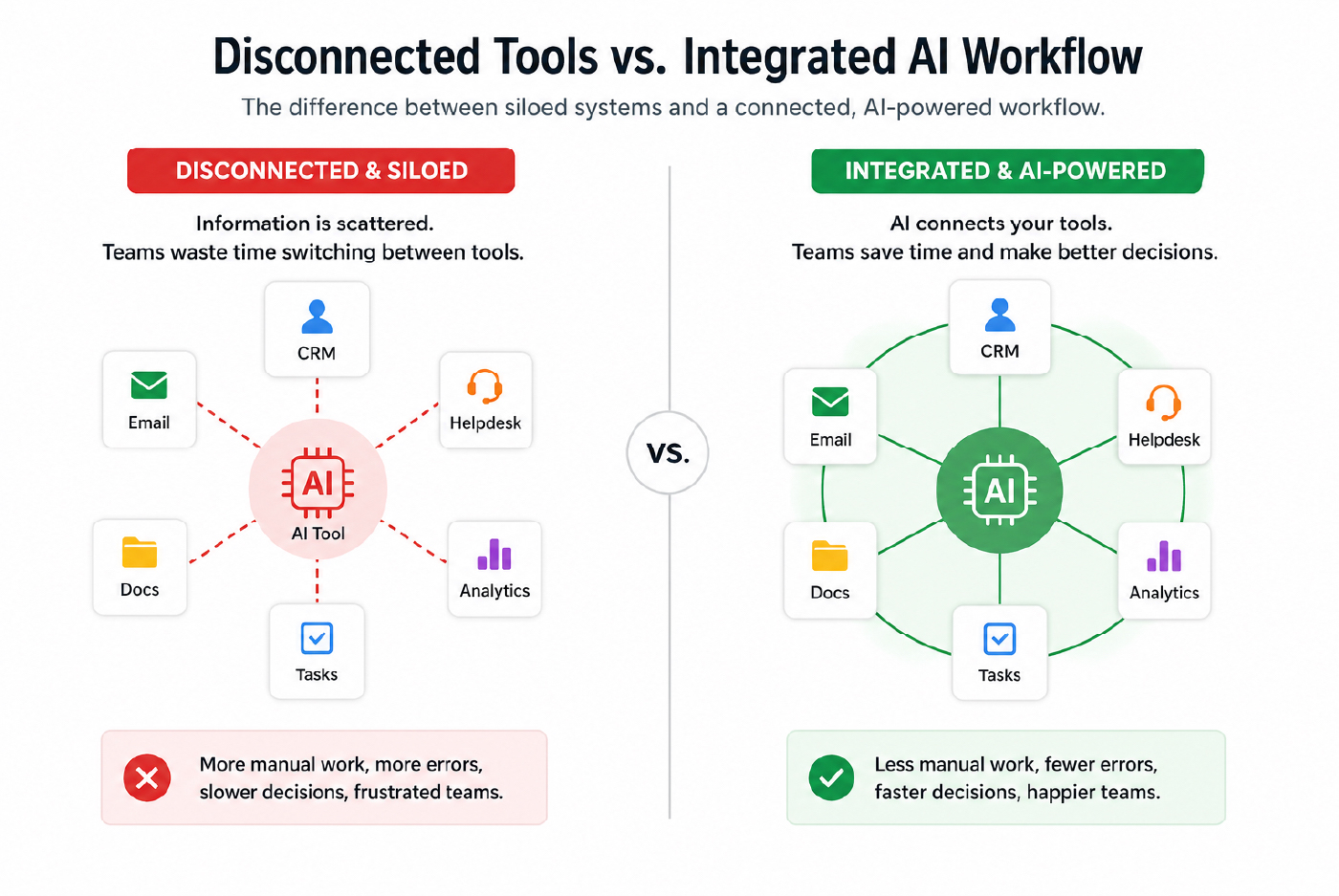
- Will It Reduce Handoffs Instead Of Creating Another Silo?
In 2026, AI integration is mostly an orchestration problem. Businesses are no longer just adding chat interfaces. They are trying to connect AI to existing workflows. That is why tools built around automation and interoperability matter so much. Zapier’s AI workflows and agents are a good example of how the market has moved toward connected systems rather than isolated features.
If you are still deciding which categories of tools matter most, it helps to look at the best AI tools for daily business use before choosing a platform.
(This visual was created with AI assistance for illustrative and educational purposes.)
4. Start With No-Code Or Low-Code Where Possible
Most businesses do not need to build custom AI systems as a first step.
For many teams, the best early wins come from:
- No-code workflow automation
- AI note and document support
- CRM-based scoring or enrichment
- Customer service AI for repetitive questions
- Internal drafting and summarization
That is why many small and mid-size teams get results faster with workflow automation and workspace AI than with custom development. The goal at the beginning is not sophistication. It is adoption and measurable improvement.
5. Run A Low-Stakes Pilot Before Full Rollout
This is one of the biggest differences between a useful AI workflow and an expensive experiment.
Before you roll anything out widely, run a pilot with:
- One Workflow
- One Team
- One Clear Owner
- One Defined Timeframe
- One Scorecard
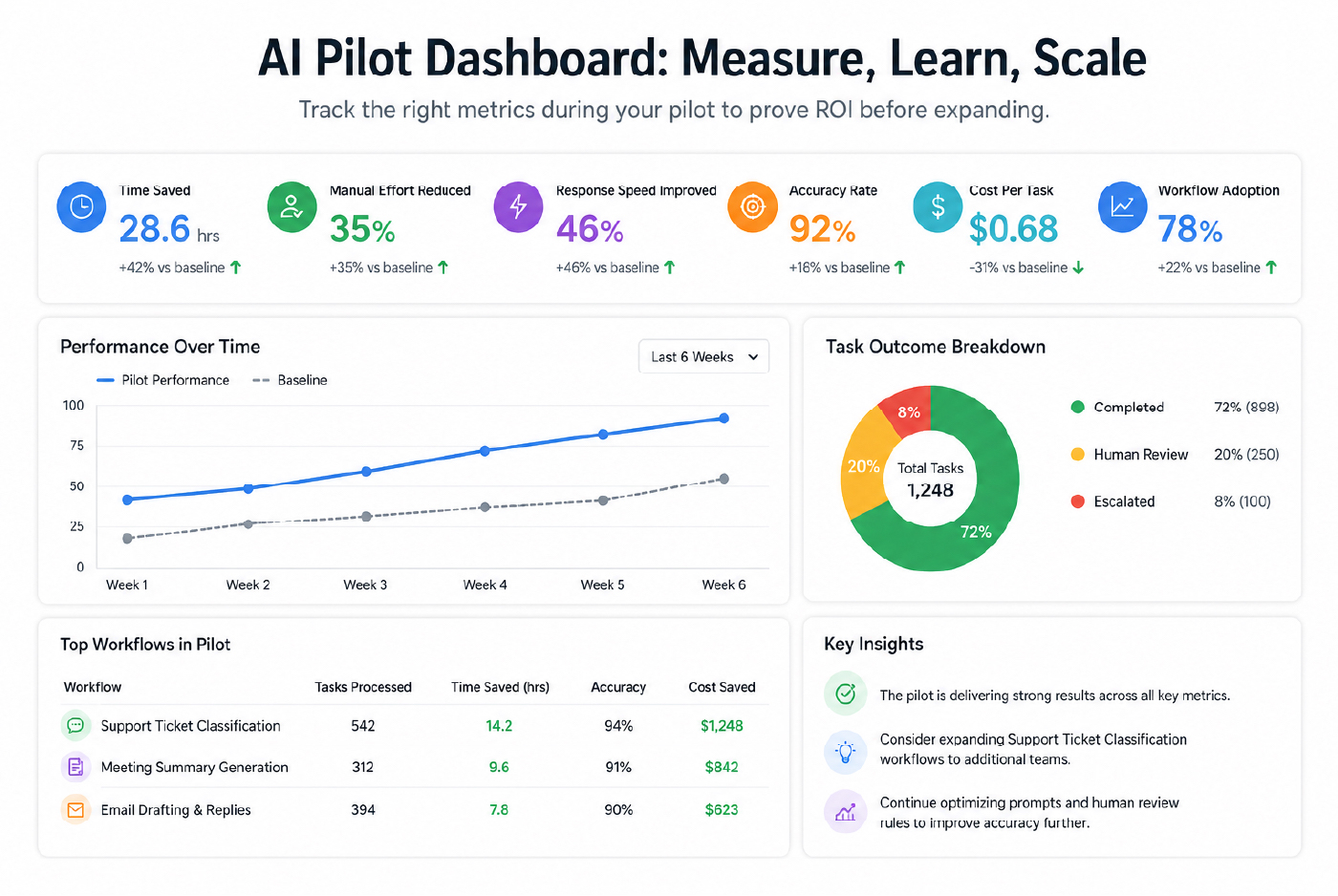
Track results like:
- Time saved
- Manual effort reduced
- Response speed improved
- Accuracy rate improved
- The cost per task lowered
- Handoff quality improved
A simple example is support ticket classification. Export a recent batch of tickets, run them through a workflow, compare the output against your current process, and measure what changed. Do not scale it until the pilot proves the workflow is actually better.
This is also why customer experience workflows are often a strong starting point. The before-and-after impact is usually easier to measure.
(This dashboard is an AI-generated sample for illustrative purposes only and does not represent real data.)
6. Define ROI Before You Expand
A lot of businesses still buy AI backwards. They buy first, then try to figure out whether the spending was justified.
A better process is to define ROI early.
That usually means deciding what you are trying to improve:
- Time Saved
- Cost Reduced
- Errors Removed
- Tickets Resolved Faster
- Leads Qualified Faster
- Content Produced Faster
- Revenue Supported
Adoption alone is not proof of value. A tool that gets attention for two weeks and then fades into the background is not a win. A simpler workflow that saves meaningful time every week usually is.
7. Keep Human Review Where Judgment Matters
The strongest AI workflows in 2026 do not remove people from every step. They place people where judgment matters most.
That usually means:
- AI Drafts, People Approve
- AI Classifies, People Escalate
- AI Summarizes, People Decide
- AI Responds To Low-Risk Queries, People Handle Edge Cases
This matters for trust, quality, and accountability. It also matters for adoption. Teams tend to trust AI more when they understand where it helps and where human judgment still stays in control.
8. Take Privacy, Security, And Data Control Seriously
This cannot be an afterthought.
Before you add any AI tool to a workflow, ask:
- Will Our Data Be Used To Train The Vendor’s Model?
- What Admin Controls Exist?
- Are There Clear Access Rules?
- Is There Support For Governance Or Data Residency?
- Can We Control Which Teams Use Which Tools?
For example, OpenAI’s business data privacy guidance says business data is not used to train models by default. That kind of clarity matters when AI touches internal documents, customer messages, or sensitive operational data.
This is also where AI and data privacy become part of workflow design, not just a compliance discussion.
9. Build Governance In Before Scale
A business-ready AI workflow should not just generate output. It should fit inside a controlled operating model.
That means asking:
- Is There An Approval Step Where Needed?
- Are There Logs Or Audit Trails?
- Can High-Risk Actions Be Restricted?
- Is There A Clear Escalation Path?
- Who Owns The Workflow Internally?
This becomes even more important as workflows become more autonomous. Platforms like Google’s Vertex AI Agent Builder reflect how enterprise AI is being framed now: not just as generation, but as governed systems that need oversight, controls, and production readiness.
10. Train The Team, Not Just The Tool
Even a good workflow can fail if the team does not trust it or know how to use it.
A practical rollout should include:
- A Short Use-Case Walkthrough
- Clear Rules For When To Rely On AI
- Examples Of Good Inputs Or Prompts
- Guidance On Reviewing Output
- A Feedback Loop For What Is Not Working
That matters most in support, sales, operations, and internal knowledge workflows, where AI is often introduced as “help” but rejected if people cannot see where it fits.
11. Expand In Layers, Not All At Once
The strongest AI rollouts grow in layers.
A good expansion path looks like this:
- Fix One Workflow
- Measure The Result
- Document What Worked
- Train The Next Team
- Reuse The Pattern
This is usually more effective than launching multiple disconnected pilots at the same time. Once one workflow works well, the business has a better model for ownership, governance, measurement, and adoption.
What To Avoid
Some mistakes still show up again and again:
- Jumping Into A Full Rebuild
- Buying Tools Before Defining The Workflow
- Ignoring Data Quality
- Letting One Department Own Everything In Isolation
- Skipping Team Training
- Measuring Activity Instead Of ROI
- Over-Customizing Too Early
- Expanding Before The Pilot Is Proven
Most failed AI rollouts come from one of those, not from the technology itself.
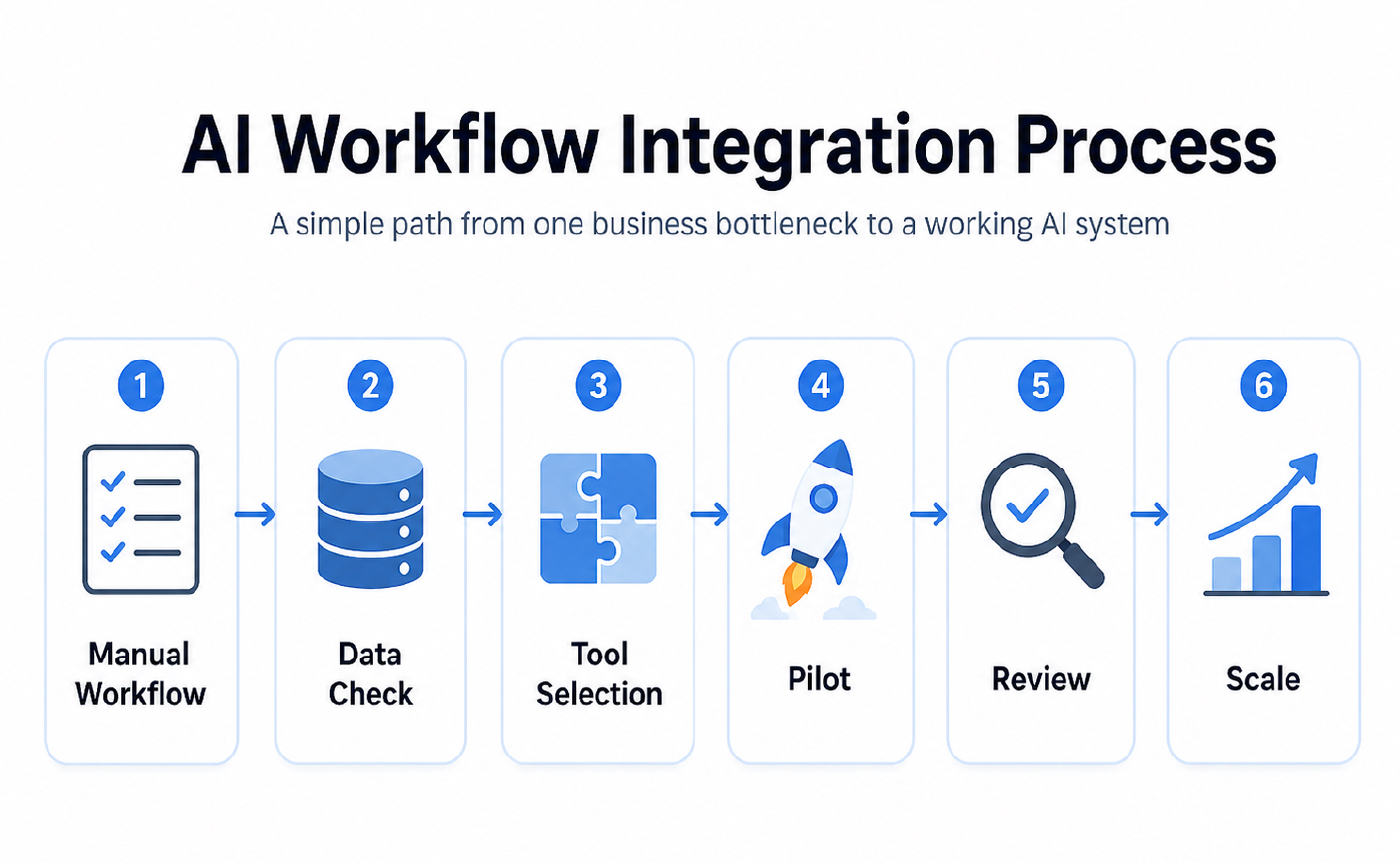
AI Integration In 6 Straightforward Moves
- Pick One Workflow That Is Manual And Slow
- Check Whether The Data Is Usable
- Choose A Tool That Fits Your Current Stack
- Run A Low-Risk Pilot
- Train The Team On Inputs, Review, And Handoffs
- Measure Results Before Expanding
That sequence works for startups, scaling teams, and larger organizations.
FAQs On Adding AI To Workflows
How Long Does AI Integration Take?
A narrow pilot can show useful signals in one to two weeks if the workflow is small and the data is clean. Broader rollout usually takes longer because integration, review, permissions, and adoption all add complexity.
Do Small Businesses Need Developers To Get Started?
Not always. Many teams can begin with automation, workspace AI, CRM-based scoring, or support agents without building custom systems from scratch.
What Is The Best First Workflow To Automate?
Usually something repetitive, measurable, and low-risk. Support classification, meeting summaries, internal reporting, FAQ automation, and basic lead prioritization are common first wins.
How Do You Prove ROI From An AI Workflow?
Track one or two clear outcomes, such as time saved, manual effort reduced, faster response times, or better routing accuracy. If the workflow does not improve a measurable outcome, do not scale it yet.
Final Thoughts
Integrating AI into business workflows in 2026 does not require rebuilding the company. The strongest results usually come from behind-the-scenes improvements that remove repetitive work, improve speed, and help teams get more from the systems they already use.
The best workflow integrations usually follow the same pattern:
- One real problem
- one connected tool
- One measured pilot
- one trained team
- one clear expansion path
That is what turns AI from a trend into an operational advantage.