

Quick Takeaways
AI-powered cybersecurity helps businesses detect threats faster by analyzing large volumes of activity, spotting unusual behavior, prioritizing alerts, and supporting faster response. In 2026, this matters because attackers are also using AI to speed up phishing, vulnerability exploitation, malware development, and social engineering.
- Use AI To Detect Patterns Humans May Miss
- Prioritize High-Risk Alerts Faster
- Keep Human Review In Security Decisions
- Protect AI Tools From Data And Access Risks
- Combine AI Detection With Strong Cyber Hygiene
- Monitor Shadow AI And AI-Driven Threats
- Treat AI As A Security Assistant, Not A Replacement
Quick Answer: What Is AI-Powered Cybersecurity?
AI-powered cybersecurity uses artificial intelligence, machine learning, automation, and behavior analytics to detect, investigate, and respond to cyber threats faster. Instead of relying only on fixed rules, AI security tools can analyze patterns across users, devices, networks, emails, cloud systems, and applications.
For example, AI can help detect unusual login behavior, suspicious email patterns, abnormal file activity, potential malware activity, and high-risk alerts that require urgent review.
This connects closely with artificial intelligence in 2026 because AI is no longer only used for productivity. It is becoming part of business security, threat detection, incident response, and risk management.
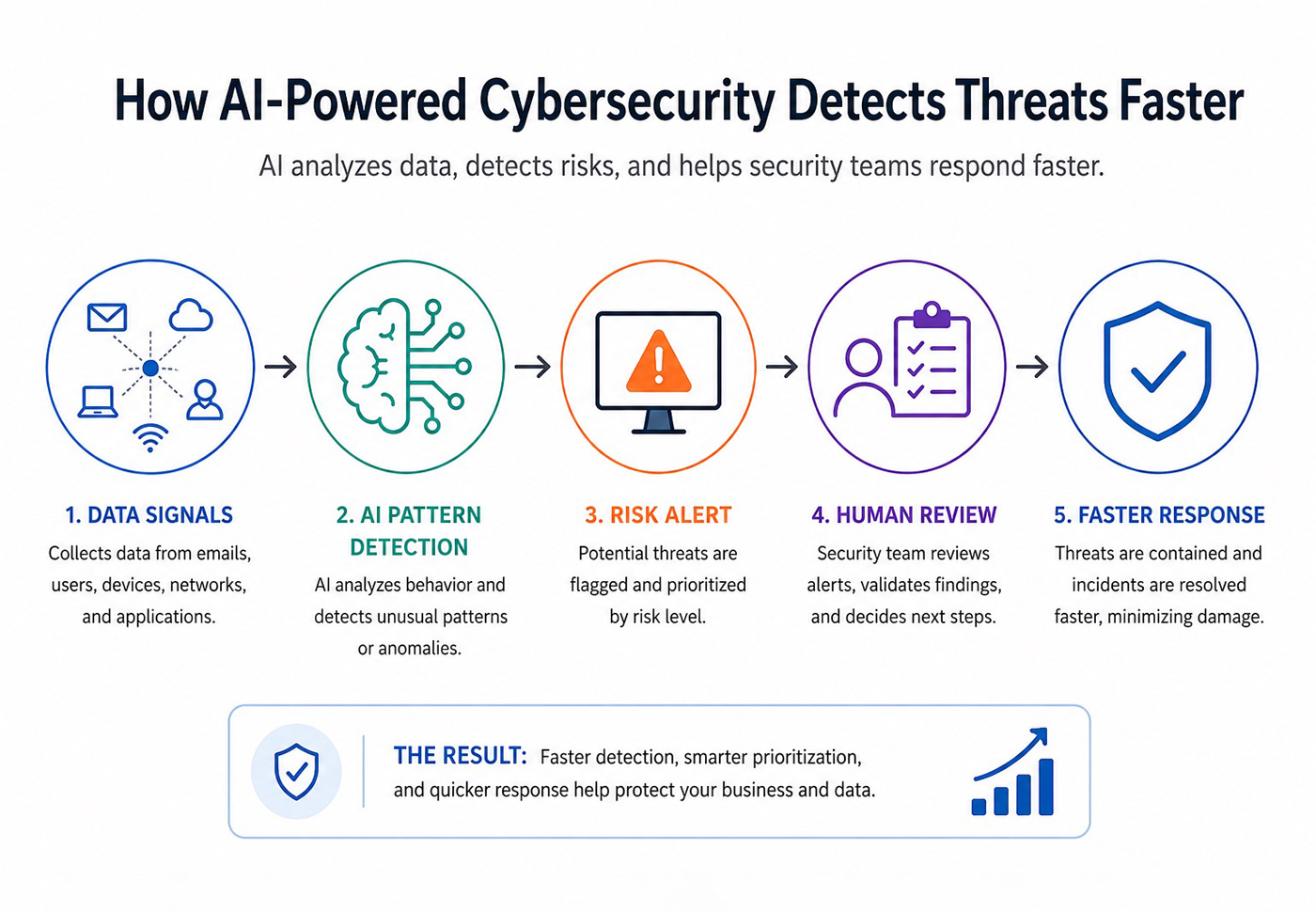
(AI-assisted infographic created for educational and illustrative purposes only.)
Why AI-Powered Cybersecurity Matters In 2026
Cyber threats are moving faster. Attackers are using automation and AI to find weak points, create more convincing phishing messages, scan for vulnerabilities, and move through systems more efficiently.
Microsoft’s Digital Defense Report 2025 explains that AI is both a cybersecurity tool and a cybersecurity risk. It also notes that defenders can use AI to scan large amounts of threat intelligence and detect early warning signs before attacks escalate.
The 2026 threat picture is even more urgent. Verizon’s 2026 Data Breach Investigations Report tracks current breach patterns and threat activity, while Reuters reported that AI is helping attackers exploit software flaws faster, shrinking the window for defense from months to hours.
At the same time, AI creates new internal risks. IBM’s Cost of a Data Breach Report 2025 highlights an “AI oversight gap,” noting that ungoverned AI systems are more likely to be breached and more costly when breached.
For companies already working on AI governance, cybersecurity should be part of the same conversation.
AI-Powered Cybersecurity vs Traditional Cybersecurity
Traditional cybersecurity often depends on known rules, signatures, manual reviews, and predefined alerts. That still matters, but it can struggle when threats move quickly or look slightly different every time.
AI-powered cybersecurity adds another layer.
Traditional cybersecurity focuses on:
- Known Threat Signatures
- Firewall Rules
- Manual Alert Review
- Static Detection Rules
- Scheduled Security Checks
- Basic Access Monitoring
AI-powered cybersecurity helps with:
- Behavior Analysis
- Anomaly Detection
- Alert Prioritization
- Threat Intelligence Review
- Phishing Pattern Detection
- Automated Investigation Support
- Faster Incident Response
The goal is not to replace traditional security. The goal is to help security teams detect suspicious activity faster and focus attention on the alerts that matter most.
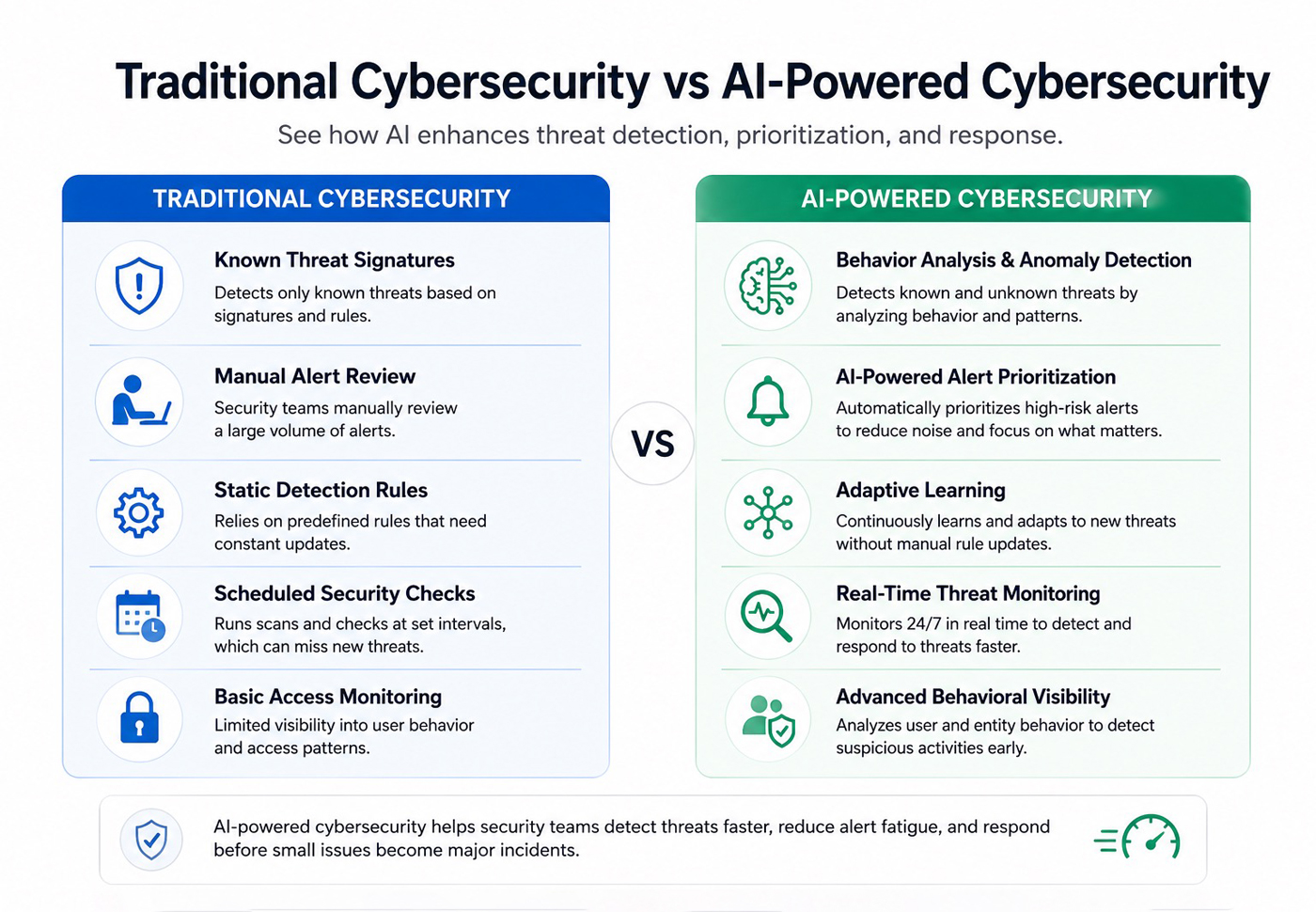
(Educational comparison graphic created with AI assistance to simplify cybersecurity concepts.)
1. AI Helps Detect Unusual Behavior Faster
One of the strongest uses of AI in cybersecurity is behavior detection.
AI tools can learn what normal activity looks like across users, devices, systems, and networks. When something looks unusual, the system can flag it for review.
Examples include:
- A User Logging In From An Unusual Location
- A Device Accessing Files It Normally Does Not Use
- A Sudden Spike In Failed Login Attempts
- A Large Data Transfer At An Odd Time
- A New Admin Action From A Suspicious Account
- A Login Pattern That Does Not Match Past Behavior
This is useful because many attacks do not look obvious at first. A stolen password may look like a normal login unless the system can compare it against behavior patterns.
AI can help spot those small differences faster.
2. AI Can Reduce Alert Fatigue
Security teams often deal with too many alerts. Some are urgent. Many are low-priority. Some are false positives.
AI can help by grouping related alerts, ranking risk, and highlighting the signals most likely to need human review.
This can support:
- Faster Triage
- Better Alert Prioritization
- Fewer Missed Critical Events
- Less Manual Sorting
- More Focused Investigations
For small and mid-size businesses, this matters because there may not be a large security team watching systems all day. AI-assisted alert triage can help teams focus on what is most likely to cause real damage.
Still, AI should not be trusted blindly. It should help prioritize alerts, not make every security decision alone.
3. AI Improves Phishing Detection
Phishing attacks are becoming more convincing because attackers can use AI to write cleaner, more personalized messages.
AI-powered cybersecurity tools can help detect phishing by analyzing:
- Message Tone
- Sender Behavior
- Link Patterns
- Attachment Risk
- Domain Similarity
- Unusual Requests
- Previous Email History
A traditional filter may block obvious spam. AI can help catch more subtle phishing attempts, such as messages that imitate a supplier, manager, payment partner, or customer.
This is especially important for small businesses because one convincing phishing email can lead to stolen credentials, invoice fraud, payment redirection, or malware infection.
If your business is already reviewing top cybersecurity threats facing small businesses, phishing should stay near the top of the list.
4. AI Supports Faster Threat Investigation
When a suspicious event happens, security teams need to understand what happened quickly.
AI can help summarize:
- Which User Was Involved
- Which Device Was Affected
- What Files Or Systems Were Accessed
- What Happened Before And After The Alert
- Whether Similar Events Happened Elsewhere
- Which Actions Should Be Reviewed First
Instead of manually checking logs across many systems, AI can help pull related evidence together. This does not remove the need for a security analyst, but it can make the investigation faster.
For businesses with limited internal security resources, this can be a major advantage.
5. AI Helps With Endpoint Detection And Response
Endpoint devices like laptops, desktops, servers, and mobile devices are common attack targets. AI can support endpoint detection by looking for unusual behavior on those devices.
AI-powered endpoint detection may flag:
- Suspicious File Changes
- Unknown Processes
- Malware-Like Behavior
- Unusual Script Execution
- Abnormal Network Connections
- Unauthorized Software Activity
CrowdStrike’s 2026 Global Threat Report findings describe adversaries combining trusted access paths, AI-enabled techniques, and cross-domain movement to evade detection.
That matters because attackers do not always rely on obvious malware anymore. Many use stolen credentials, legitimate tools, unmanaged systems, and quiet movement across identity, cloud, and endpoint environments.
AI can help detect suspicious behavior even when the attack does not match a known malware signature.
6. AI Can Strengthen Cloud Security Monitoring
Businesses now store data across cloud apps, SaaS platforms, remote work tools, and online collaboration systems. That makes cloud visibility important.
AI can help monitor cloud environments for:
- Unusual Login Patterns
- Risky File Sharing
- Suspicious API Activity
- Misconfigured Permissions
- Privilege Escalation
- Abnormal Data Downloads
- Unapproved App Connections
This is especially useful when teams use many cloud tools at once. A single weak password, exposed file, or over-permissioned account can create a serious risk.
AI helps by connecting signals across systems instead of treating every event separately.
7. AI Can Improve Threat Intelligence
Threat intelligence is about understanding attacker behavior, known vulnerabilities, malicious infrastructure, phishing trends, malware campaigns, and emerging risks.
AI can help security teams process large amounts of threat intelligence faster.
It can assist with:
- Summarizing Threat Reports
- Connecting Similar Indicators
- Finding Patterns Across Incidents
- Prioritizing Relevant Threats
- Matching Threats To Business Systems
- Identifying Early Warning Signs
This is one of the clearest benefits of AI in cybersecurity. It helps teams handle more information than they could manually review.
8. AI Helps Small Businesses Respond Faster
Small businesses usually do not have a full security operations center. That does not mean they cannot benefit from AI-powered cybersecurity.
AI can help smaller teams with:
- Suspicious Login Alerts
- Phishing Detection
- Endpoint Monitoring
- Email Security
- Cloud App Monitoring
- Automated Ticket Summaries
- Basic Incident Prioritization
- Security Report Drafts
The key is to start with practical tools and workflows. A small business does not need an advanced enterprise AI security platform on day one. It needs better visibility, faster alerts, and safer response processes.
This connects naturally with how small businesses can defend against 2026 cyber threats. AI can support defense, but it should sit on top of strong basics like MFA, backups, patching, password hygiene, and employee training.
9. AI Creates New Cybersecurity Risks Too
AI is not only a defense tool. Attackers can also use it.
AI can help attackers:
- Write More Convincing Phishing Emails
- Generate Malicious Code Faster
- Find Vulnerabilities More Quickly
- Create Deepfake Voice Or Video Scams
- Automate Reconnaissance
- Personalize Social Engineering Attacks
- Scale Attacks Across More Targets
Reuters reported that Verizon’s 2026 DBIR found attackers using generative AI across stages of attacks, including targeting, gaining access, and developing malicious tools. The same report said vulnerability exploitation accounted for 31% of reviewed breaches, overtaking stolen credentials as the top initial access vector.
That is why businesses should not treat AI as a magic shield. AI-powered cybersecurity is useful, but it must be combined with clear policies, employee training, strong access controls, and incident response planning.
The businesses that use AI safely will be the ones that understand both sides: AI helps defenders move faster, but it also helps attackers move faster.
10. Watch For Shadow AI And Data Exposure
Shadow AI happens when employees use unapproved AI tools without the company knowing. This can create cybersecurity and privacy risks.
Examples include:
- Uploading Customer Data To A Personal AI Tool
- Pasting Source Code Into An Unapproved Chatbot
- Summarizing Confidential Documents In A Free Tool
- Using AI Browser Extensions Without Review
- Connecting AI Tools To Business Apps Without Approval
The same Reuters report on Verizon’s 2026 DBIR noted that shadow AI became the third most common non-malicious insider action in data loss incidents, often involving sensitive data such as source code.
CISA’s AI guidance focuses on helping organizations adopt AI securely, and CISA’s joint guide on securing AI data highlights data security across the AI lifecycle.
For businesses, the lesson is simple: AI tools must be approved, monitored, and governed. Otherwise, the tool meant to improve productivity can become a data exposure risk.
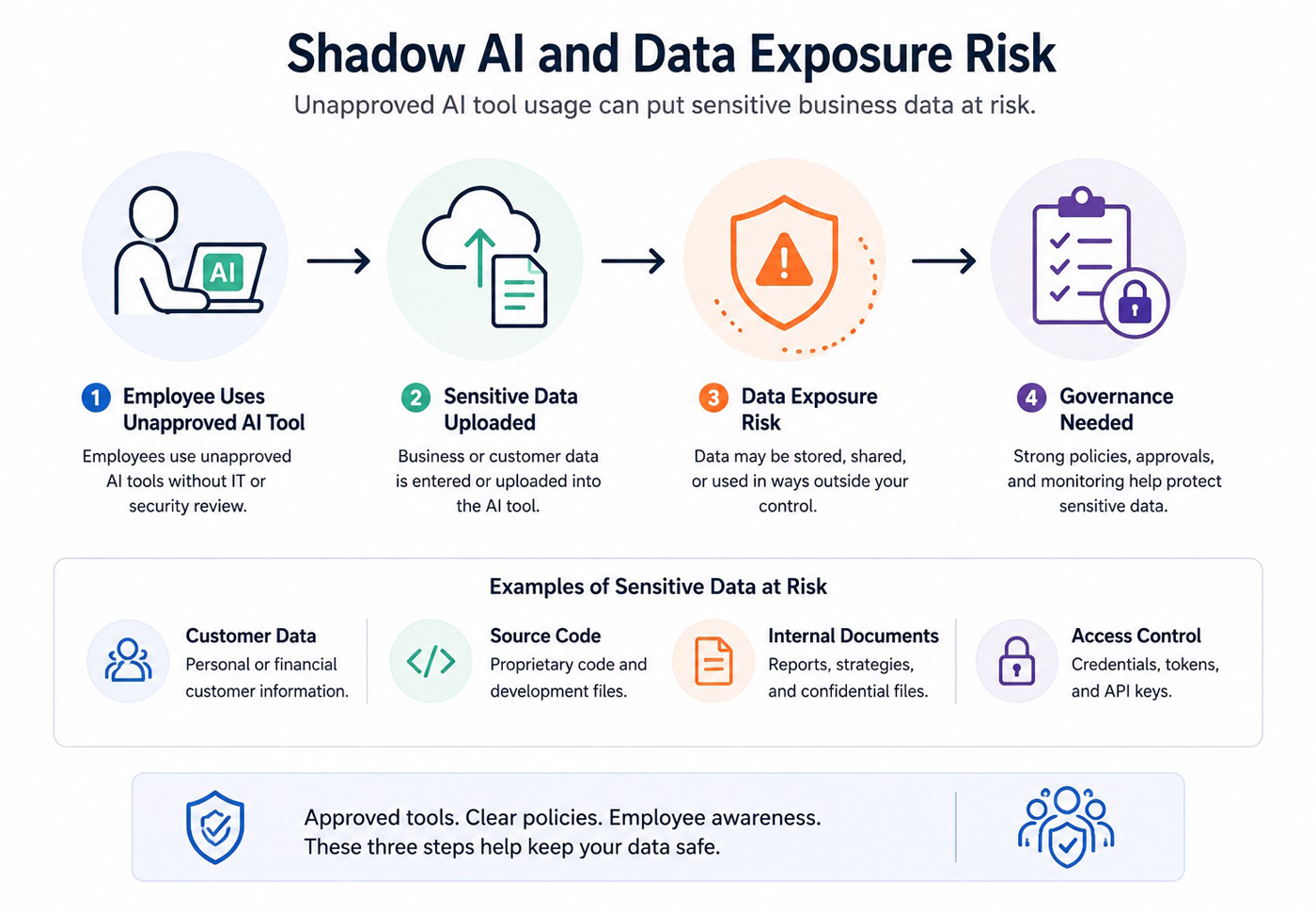
(AI-assisted visual illustrating common shadow AI and data exposure risks for educational purposes.)
11. Add Governance To AI Security Tools
AI security tools need governance too. A product may promise faster detection, but the business still needs to understand how it uses data, what actions it can take, and where human review fits.
Before approving an AI security tool, ask:
- What Data Does The Tool Ingest?
- Can Alerts Be Reviewed By A Human?
- Are Logs And Audit Trails Available?
- Can Automated Actions Be Restricted?
- Does The Vendor Explain How AI Is Used?
- Can Sensitive Data Be Excluded Or Controlled?
- Can The Tool Be Paused Or Rolled Back?
- Who Owns The Final Security Decision?
This is especially important when the tool can isolate devices, block users, quarantine files, change permissions, or trigger automated response actions.
The stronger the automated action, the stronger the review and governance should be.
12. Human Review Still Matters In AI Security
AI can detect patterns quickly, but humans still need to make important security decisions.
Human review is important for:
- Confirming High-Risk Alerts
- Reviewing Account Lockouts
- Investigating Customer Impact
- Deciding Whether To Shut Down Systems
- Handling Legal Or Compliance Issues
- Communicating With Customers
- Reporting Incidents
A good structure looks like this:
- AI Detects
- AI Prioritizes
- Human Reviews
- Human Decides
- Team Responds
- System Learns
This keeps speed and accountability together.
AI should make security teams faster, not remove responsibility from them.
13. What Businesses Should Look For In AI Cybersecurity Tools
Not every AI security product is useful. Businesses should evaluate tools carefully.
Look for:
- Clear Detection Logic
- Strong Integration With Existing Systems
- Good Alert Prioritization
- Human Review Options
- Audit Logs
- Data Privacy Controls
- Vendor Transparency
- Low False-Positive Rates
- Easy Reporting
- Incident Response Support
Avoid tools that promise fully automated protection without explaining how alerts, data, and decisions are handled.
Cybersecurity is too important for vague AI claims.
14. How To Start With AI-Powered Cybersecurity
Businesses should not start by buying the most expensive AI security platform. Start with the highest-risk gaps.
A practical starting plan:
- Review Current Cybersecurity Weaknesses
- Identify High-Volume Alert Areas
- Strengthen MFA, Backups, And Patching
- Add AI-Assisted Email Or Endpoint Protection
- Monitor Suspicious Login Behavior
- Train Employees On AI-Driven Phishing
- Define Human Review Rules
- Track Response Time And False Positives
Small businesses should start with the basics. Mid-size and enterprise teams can go deeper with AI-assisted SOC tools, threat intelligence, endpoint detection, and cloud security monitoring.
AI-Powered Cybersecurity Checklist For 2026
Before adopting AI-powered cybersecurity tools, check:
- Do We Know Our Biggest Security Risks?
- Are MFA, Backups, And Patching Already In Place?
- Can The Tool Integrate With Our Existing Systems?
- Does It Prioritize Alerts Clearly?
- Can Humans Review High-Risk Decisions?
- Are Logs And Reports Available?
- Does The Vendor Explain Data Handling Clearly?
- Are Employees Trained On AI-Driven Phishing?
- Do We Have A Plan For Shadow AI?
- Can We Measure Faster Detection Or Response?
Common Mistakes To Avoid
Avoid these mistakes when using AI for cybersecurity:
- Treating AI As A Complete Replacement For Security Teams
- Ignoring Basic Cyber Hygiene
- Buying Tools Without Clear Use Cases
- Letting AI Take High-Risk Actions Without Review
- Ignoring Shadow AI
- Failing To Train Employees
- Trusting Every Alert Without Investigation
- Ignoring False Positives
- Not Reviewing Vendor Data Practices
- Forgetting Incident Response Planning
AI-powered cybersecurity works best when it supports a clear security process.
FAQs About AI-Powered Cybersecurity
What Is AI-Powered Cybersecurity?
AI-powered cybersecurity uses artificial intelligence, machine learning, and automation to detect threats, prioritize alerts, analyze behavior, and support faster response.
How Does AI Detect Cyber Threats?
AI detects cyber threats by analyzing patterns across users, devices, networks, emails, applications, and cloud systems. It looks for unusual behavior that may indicate phishing, malware, account compromise, vulnerability exploitation, or data exposure.
Can AI Stop Cyberattacks Automatically?
AI can help block or contain some threats, but high-risk decisions should still include human review. A fully automated response can create problems if the system makes a wrong decision.
Is AI Cybersecurity Useful For Small Businesses?
Yes. Small businesses can use AI-powered email security, endpoint protection, login monitoring, and automated alert summaries to improve visibility and response speed.
What Are The Risks Of AI In Cybersecurity?
Risks include false positives, data exposure, over-automation, shadow AI, poor vendor controls, and attackers using AI to create smarter phishing or faster exploitation.
Does AI Replace Cybersecurity Professionals?
No. AI helps security teams work faster, but humans are still needed for judgment, investigation, communication, compliance, and incident response.
Final Thoughts
AI-powered cybersecurity in 2026 is not about replacing security teams. It is about helping businesses detect threats faster, understand alerts more clearly, and respond before small issues become major incidents.
The best approach is balanced:
- Use AI For Speed
- Use Humans For Judgment
- Keep Data Protected
- Monitor Shadow AI
- Strengthen Cyber Hygiene
- Measure Detection And Response Improvements
AI can make cybersecurity stronger, but only when it is used with clear controls, reliable tools, and responsible oversight.





3 Responses
gulfarazahmed08@gmail.com
gulfarazahmed08@gmail.com
gulfarazahmed08@gmail.com