


Quick Takeaways
YouTube automation with AI in 2026 means using AI tools to handle scripting, voiceovers, visuals, editing, and SEO so a channel can publish consistently without a full production team. It is not about removing effort — it is about removing repetitive manual work while a person still controls strategy, quality, and final review.
- Automation Works Best When It Follows a Real Workflow, Not Random Tools
- AI Can Handle Scripts, Voiceovers, Visuals, and Editing — Not Strategy
- Human Review Protects Quality, Compliance, and Monetization
- Consistency and Retention Matter More Than Volume
- Disclosure Is Required When Content Uses Synthetic Media
- Faceless Channels Can Compete If The Niche And Angle Are Specific
- Track Retention And Watch Time Before Scaling Output
What Is YouTube Automation With AI?
YouTube automation with AI in 2026 is the practice of using artificial intelligence tools to handle most stages of video production — idea research, scriptwriting, voiceover generation, visual assembly, editing, thumbnails, and metadata — so a creator or small team can run a channel without doing every step manually.
Instead of one person writing, filming, editing, and uploading everything themselves, an AI-powered workflow connects several specialized tools into a single pipeline. A creator can supervise ten channels the same way they used to manage one, because AI now performs the repetitive production work.
This connects closely with how AI is reshaping content creation more broadly, since the same generative AI principles that apply to blogs and social posts apply to video scripts and voiceovers too.
Why YouTube Automation With AI Matters in 2026
YouTube’s algorithm in 2026 rewards two things above everything else: consistency and retention. Manual production makes both difficult, because a single creator can only script, film, and edit so many videos before burnout sets in.
Industry data backs this shift. A widely cited 2025 creator (TechCrunch) survey found that a large majority of YouTubers now use AI somewhere in their workflow, with more than half using it specifically for video production to increase output without increasing burnout. Search interest in terms like “automate YouTube video upload” and “AI YouTube automation tools” has also surged sharply over the past year, showing that creators everywhere — not just in one region — are actively searching for ways to scale channels with less manual work.
This matters for a global audience because AI tools remove the language and resource barriers that used to limit who could run a competitive channel. A creator in Lahore, Lagos, or Los Angeles can now access the same AI voiceover, scripting, and editing tools, which levels the playing field for faceless and international channels.
1. Start With A Specific Niche, Not A Broad Topic
The most common mistake in YouTube automation is picking a broad category like “facts” or “motivation” instead of a specific, defensible niche.
Strong niches forAI-assisted channels usually share these traits:
- Searchable, Recurring Demand
- Enough Depth For 50+ Video Ideas
- Available Source Material (Data, News, Public Information)
- Low Reliance On The Creator’s Face Or Personal Brand
- Room For A Unique Angle Or Format
Popular 2026 niches include AI and tech explainers, personal finance breakdowns, history and true crime summaries, productivity and remote work content, and educational science topics. The channels that last are the ones that pick a specific angle inside a niche rather than copying the exact format of an existing channel.
2. Build an AI-Powered Scriptwriting Workflow
Every automated video starts with a script, so this is the foundation of the entire pipeline.
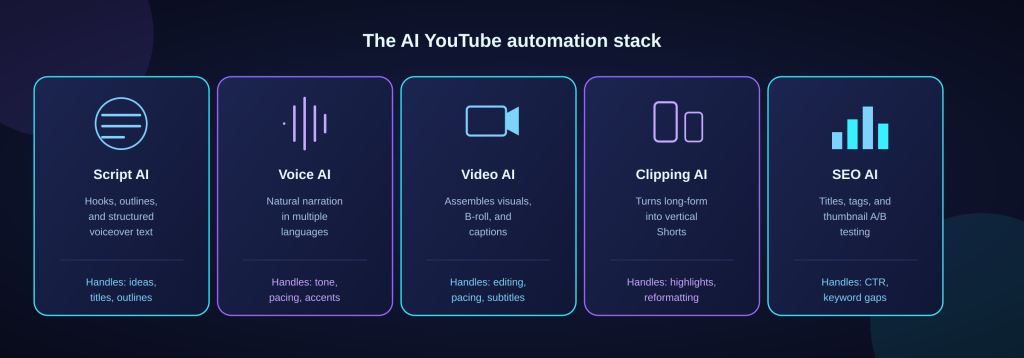
Large language models like ChatGPT and similar tools act as the “creative director” of the workflow. They can turn a vague topic into a structured script, generate multiple title and hook variations in seconds, and format output as structured data — separating voiceover text from visual scene descriptions — so it feeds cleanly into the next tools in the pipeline.
- A practical prompt structure looks like this:
- Ask ForA Table With Three Columns: Voiceover, Visual Description, Estimated Duration
- Request 5–10 Hook Variations for The First 15 Seconds
- Ask For A Retention-Focused Outline, Not Just A Script
This structured approach saves hours compared to writing scripts from scratch and keeps every downstream tool synchronized.
3. Use AI Voiceover Tools for Natural-Sounding Narration
Robotic narration is one of the fastest ways to lose viewer trust and retention. AI voice generation has improved enough in 2026 that natural-sounding, human-like narration is now standard for faceless channels.
Modern AI voiceover tools can capture breath, pacing, and emotional tone, making narration difficult to distinguish from a professional voice actor. For creators building a global audience, this also means access to natural-sounding voices across multiple languages and accents, which opens international audiences without hiring local voice talent.
When choosing a voiceover tool, check for commercial usage rights, multiple language support, and pacing controls — these three factors affect both compliance and viewer retention.
4. Automate Visual Assembly Without Losing Quality
Once a script and voiceover exist, AI video generation tools can assemble visuals, stock footage, captions, and transitions automatically based on the script text.
Common approaches for faceless YouTube automation include:
- Stock Footage Assembly Matched To Script Keywords
- AI-Generated B-Roll and Animated Scenes
- Photorealistic AI Avatars for Face-Based Explainer Content
- Automated Caption and Subtitle Generation
- Template-Based Motion Graphics for Data And Lists
The goal is not to remove creative judgment — it is to remove the manual, repetitive parts of editing so a person can focus on pacing, hook strength, and story structure.
5. Turn Long-Form Videos Into Shorts Automatically
Shorts remain one of the fastest ways to grow subscribers in 2026, and AI clipping tools
have made repurposing long-form content far more efficient.
Tools built for this task can take a long-form video, automatically identify the strongest hooks and moments, clip them, add dynamic captions, and reformat them for vertical viewing. Many automated channels now publish multiple Shorts per day without a dedicated editor, using this single workflow.
A simple repurposing pipeline looks like this:
- Publish One Long-Form Video
- Run It Through an AI Clipping Tool
- Select The Top 3–5 Auto-Generated Clips
- Add Branded Intro and Captions
- Schedule Shorts Across The Week
6. Use AI for SEO, Titles, and Metadata
YouTube automation with AI is not only about production — discoverability matters just as much. AI-powered SEO tools can analyze search demand, predict which titles are likely to drive the highest click-through rate, and surface rising topics before they become saturated.
Useful AI SEO tasks include:
- Keyword and Search Volume Research For Video Topics
- AI-Generated Title Variations Tested Against Historical CTR Data
- Automated Description and Tag Generation
- Thumbnail A/B Testing To Find The Highest-Performing Version
- Competitor Gap Analysis To Find Low-Competition Topics
This is the same principle behind AI search optimization for written content — search engines and platform algorithms both reward content that is clearly structured, relevant, and matched to real search intent.
7. Schedule and Publish on Autopilot
Many creators now use automation platforms to schedule uploads, publish across multiple channels, and even manage cross-platform distribution without manual intervention. This keeps a channel active and consistent even when the creator is not actively working that day.
A simple automated publishing workflow:
- Script And Voiceover are Generated
- Video Is Assembled and Reviewed
- Metadata and Thumbnail are Finalized
- Upload Is Scheduled for The Channel’s Best-Performing Time Slot
- Performance Is Tracked After Publishing
Consistency built this way tends to outperform manual, irregular posting schedules, because the algorithm favors channels that upload predictably.
8. Stay Compliant With AI Disclosure Rules
YouTube automation is fully permitted, but it comes with responsibilities. Channels using synthetic media — AI-generated faces, voices, or events that could be mistaken for real people or events — are required to disclose this to viewers, typically through a description note or on-screen label. (reference link)
Metadata tools, script assistants, and basic text-based editing generally do not require disclosure. The disclosure requirement mainly applies when AI creates realistic faces, voices, or scenarios that could mislead a viewer into thinking they are watching real footage.
Monetization remains available for automated and AI-assisted channels as long as content is original, adds value, and follows platform disclosure and reused-content policies. Channels that simply recycle other creators’ footage or mass-produce near-identical low-effort videos are the ones facing demonetization risk — not automation itself.
9. Keep Human Review in the Loop
The channels that succeed long-term treat AI as a production assistant, not a replacement for judgment. A safe structure looks like this:
- AI Drafts The Script, Human Approves The Angle
- AI Generates The Voiceover, Human Checks Pacing And Tone
- AI Assembles Visuals, Human Reviews For Accuracy
- AI Suggests Titles, Human Confirms Brand Fit
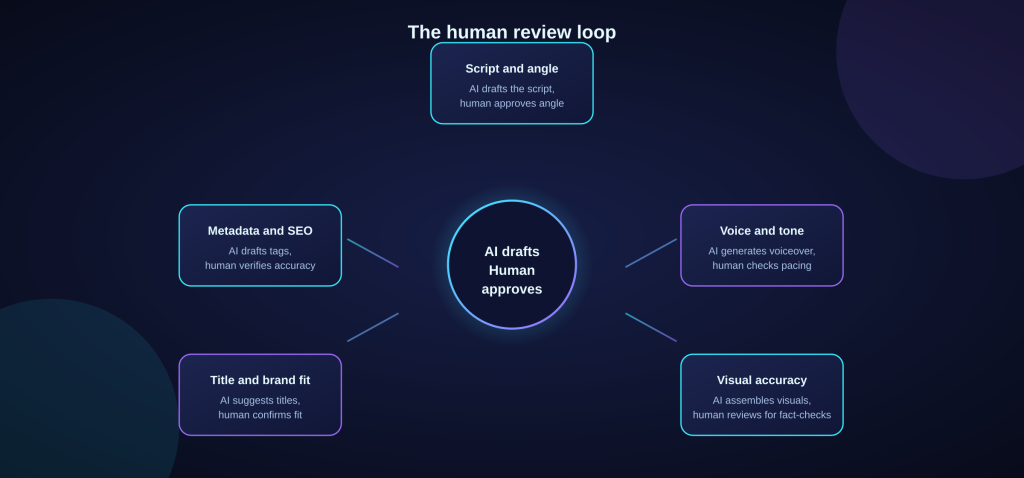
Most successful automated channels in 2026 report automating around 70% of production while keeping human control over ideas, tone, and final quality checks. This balance is what separates a sustainable channel from one that gets flagged for repetitive, low-effort content.
10. Track the Right Metrics Before Scaling
Automation should improve retention, watch time, and consistency — not just increase upload volume. Before adding more channels or tools, track:
- Average View Duration
- Click-Through Rate On Thumbnails and Titles
- Subscriber Conversion Rate
- Shorts-To-Long-Form Conversion
- Time Saved Per Video
If a workflow improves these numbers, it is worth scaling. If it only increases the number of videos published without improving retention, the workflow needs adjustment before expanding further.
YouTube Automation With AI: Sample Workflow
Here is a complete example pipeline a solo creator or small team can follow:
- Research Topic and Search Demand With an AI SEO Tool
- Generate A Structured Script With an AI Writing Assistant
- Produce A Natural-Sounding Voiceover With an AI Voice Tool
- Assemble Visuals, Captions, And Transitions With an AI Video Tool
- Review The Full Draft For Accuracy And Pacing
- Generate Title, Description, And Tags With AI SEO Tools
- Schedule The Upload for Peak Audience Times
- Repurpose The Video Into Shorts With an AI Clipping Tool
- Track Retention And CTR After Publishing
Common Mistakes to Avoid With YouTube Automation
- Choosing a Niche Based On Hype Instead Of Demand and Depth
- Skipping Human Review Of AI-Generated Scripts
- Using Robotic, Low-Quality Voiceovers
- Ignoring Synthetic Media Disclosure Requirements
- Publishing High Volume Without Checking Retention
- Copying Other Automated Channels Exactly
- Forgetting to A/B Test Titles And Thumbnails
- Treating Automation as a Replacement For Strategy
FAQs About YouTube Automation With AI in 2026
Is YouTube Automation With AI Still Profitable in 2026?
Yes. Automation remains profitable when channels focus on a specific niche, maintain quality control, and use AI to remove repetitive production work rather than to mass-
produce low-effort content.
Does YouTube Penalize AI-Generated Content?
YouTube does not penalize AI use on its own. It penalizes low-effort, repetitive, or misleading content. Original, value-adding videos that follow disclosure rules remain fully eligible for monetization.
What Are the Best AI Tools for YouTube Automation?
A typical stack includes an AI writing assistant for scripts, an AI voice generator for narration, an AI video tool for visual assembly, an AI clipping tool for Shorts, and an AI-powered SEO tool for titles, tags, and thumbnail testing.
Can I Run a Faceless YouTube Channel With AI Alone?
Yes. Faceless channels are one of the most common formats for AI-assisted automation, using AI voiceovers, stock or AI-generated visuals, and structured scripts instead of on-camera talent.
How Much Does It Cost to Start an Automated YouTube Channel?
Costs vary widely, but many creators start with a mix of free and low-cost tools, spending a modest amount per video before scaling into more advanced paid tools once a workflow proves profitable.
Do I Need to Disclose AI Use on YouTube?
Disclosure is required when a video includes realistic AI-generated faces, voices, or events that could be mistaken for real footage. Script assistance and metadata tools generally do not require disclosure.
Final Thoughts
YouTube automation with AI in 2026 is not about replacing creativity — it is about removing the repetitive production work that used to limit how many quality videos a single person or small team could publish. The channels that succeed treat AI as a production assistant across scripting, voiceovers, visuals, and SEO, while keeping human judgment in control of strategy, tone, and final quality.
The path forward is straightforward: pick a specific niche, build a repeatable AI-assistedworkflow, follow disclosure rules, and measure retention before scaling to more channels or higher output. Done this way, YouTube automation becomes a sustainable system rather than a shortcut — and that is exactly what search engines, viewers, and the platform itself continue to reward.
Important: This content is for informational purposes only. Readers should verify tool pricing, platform policies, and monetization rules directly with YouTube and relevant AI tool providers before building an automated channel.







7 Responses
Great article!
gulfarazahmed08@gmail.com
gulfarazahmed08@gmail.com
gulfarazahmed08@gmail.com
gulfarazahmed08@gmail.com
gulfarazahmed08@gmail.com
gulfarazahmed08@gmail.com