
Quick Answer
The best AI tools in 2026 are not one single app. For most people, the strongest daily stack now includes ChatGPT for broad everyday work, Claude for deeper reasoning, Gemini for Google-connected workflows, Perplexity for research, Notion AI for documentation and workspace support, Cursor or GitHub Copilot for coding, Zapier for automation, Canva Magic Studio or Adobe Firefly for design, and Synthesia for AI video.
The real shift in 2026 is that AI is no longer one product category. It is a practical stack built around how people actually work.
If You Only Want 3 Tools, Start Here
If you want the fastest practical setup, start with:
- ChatGPT for writing, planning, and general work
- Perplexity for research
- Zapier if you need automation, or Notion AI if you need documentation and workspace support
That combination covers the most common needs without too much overlap. ChatGPT handles output, Perplexity handles source-backed discovery, and Zapier or Notion AI handles systems and workflow fit.
Introduction
AI tools are everywhere in 2026, but many “best AI tools” guides still feel outdated because they repeat the same shortlist without reflecting how the market has changed.
The real shift now is not just stronger models. It is deeper integration into real work, stronger research systems, AI-native coding environments, automation across apps, and multimodal tools that handle text, visuals, and video in one stack. OpenAI’s GPT-5.4 update highlights difficult real-world work across coding, documents, spreadsheets, presentations, and research. Google’s March 2026 Gemini updates show the same shift toward tighter product integration.
That means the best tool depends less on hype and more on what you actually need to do every day. If you want the broader context first, start with Artificial Intelligence in 2026: How It Works & Why It Matters.
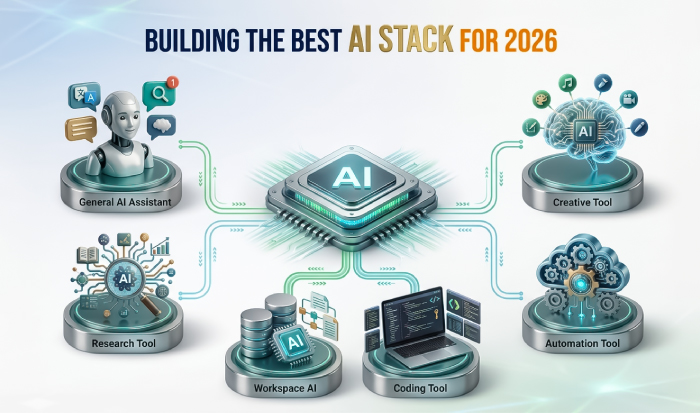
This visual has been created with the assistance of AI to simplify complex concepts and improve clarity.How to Use This Guide
Use this article based on the work you do most:
- Choose ChatGPT if you want one flexible everyday tool
- Choose Claude if your work is document-heavy and reasoning-heavy
- Choose Gemini if your workflow lives in Google tools
- Choose Perplexity if research is the bottleneck
- Choose Notion AI if your team lives in docs, notes, and internal knowledge
- Choose Cursor or GitHub Copilot if you code
- Choose Zapier if you need AI to take action across apps
- Choose Canva Magic Studio, Adobe Firefly, or Synthesia if design or video is part of your repeated workflow
This job-first approach is what makes AI useful in practice.
What Makes an AI Tool Worth Using in 2026?
A tool is worth using daily when it removes repeated friction from real work. In practice, that usually means it:
- saves time quickly
- fits into the way you already work
- produces usable output without too much cleanup
- scales from solo use to team use
- reduces context switching
That is why tools built into workspaces, coding environments, and automation systems are winning in 2026. ChatGPT is being framed around everyday productivity and professional work, Gemini around ecosystem fit, Notion AI around AI inside workspace systems, Cursor around AI-first development, and Zapier around workflow orchestration.
AI Assistants vs AI Agents
This distinction matters now because the market is no longer just about chat interfaces.
- AI assistants mainly help you think, write, summarize, explain, and plan
- AI agents go further by taking action across tools, workflows, or systems
ChatGPT, Claude, Gemini, and Perplexity are still mainly used as assistants, though all of them are moving toward more agent-like capabilities. Zapier, Cursor, and parts of Notion AI increasingly reflect the next layer, where AI does not just answer but helps execute steps inside a workflow.
Quick Comparison
| Tool | Best for | Biggest strength | Choose it if… |
| ChatGPT | general work | versatility | You want one flexible everyday AI |
| Claude | long-context analysis | deep reasoning | You work with large documents and deeper synthesis |
| Gemini | Google-connected work | ecosystem fit | Your workflow already lives in Google apps |
| Perplexity | research | source-backed answers | You need fast discovery and research first |
| Notion AI | documentation and search | workspace-native AI | Your team already runs on docs and notes |
| Cursor | AI-native coding | codebase-aware development | You want deeper agent-style coding help |
| GitHub Copilot | team coding | easier team adoption | Your team wants AI inside familiar dev tools |
| Zapier | automation | app orchestration | You want AI to trigger actions across systems |
| Canva Magic Studio | quick design | easy visual production | You need speed and low-friction creative work |
| Adobe Firefly | pro creative work | broader creative generation | You need more creative depth and brand asset production |
| Synthesia | AI video | scalable business video | Video is a repeated business need |
The Best AI Tools in 2026
ChatGPT: Best overall for most people
ChatGPT remains one of the strongest daily-use tools because it works across writing, planning, summarizing, ideation, coding help, charts, and broad knowledge work. OpenAI’s GPT-5.4 release positions it for difficult real-world work across documents, spreadsheets, charts, coding, and agent-style tasks.
Use ChatGPT when you need:
- writing help
- brainstorming
- summaries
- multi-purpose planning
- broad everyday support
Choose ChatGPT over Claude when you want a more flexible all-rounder rather than a tool optimized for heavier document analysis.
Choose ChatGPT over Perplexity when the task is output creation rather than source-led research.
For content-heavy work, this pairs naturally with using generative AI well in content workflows.
Claude: Best for analysis, long documents, and reasoning-heavy work
Claude is strongest when the job needs more depth, more context, or more careful reasoning. Anthropic says Claude Opus 4.6 plans more carefully, sustains agentic tasks for longer, improves debugging and code review, and works with a much larger context window.
Use when you need:
- long-document review
- synthesis of large information sets
- strategy documents
- reasoning-heavy work
- deeper coding analysis
Choose Claude over ChatGPT when you are working through larger documents, denser reasoning, or more analysis-heavy tasks.
Choose Claude over Gemini when the workflow is less about ecosystem fit and more about deep processing.
Gemini: Best for Google-connected workflows
Gemini is one of the most relevant AI tools in 2026 for people working heavily inside Google’s ecosystem. Google’s updates emphasize stronger Gemini Live, more personalization, memory migration, and tighter support across Google apps.
Use Gemini when you need:
- Google-connected planning
- drafting inside a Google-heavy workflow
- app-integrated assistance
- support across Docs, Sheets, Drive, Gmail, and Android
Choose Gemini over ChatGPT when your work already lives inside Google tools and you want stronger ecosystem fit.
Choose Gemini over Perplexity when the priority is workflow integration rather than research.
Perplexity: Best for research and source-backed answers
Perplexity remains one of the strongest AI research tools in 2026 because it is built as an answer engine rather than just a conversation interface. Its changelog shows expansion into Deep Research, memory, model choice, better history search, enterprise deployment, and structured output like presentations and spreadsheets.
Use Perplexity when you need:
- fast topic research
- source discovery
- comparing viewpoints
- fact-finding before writing or analysis
Choose Perplexity over ChatGPT or Gemini when the first job is research, not writing.
Choose Perplexity over Claude when you need quick source-backed discovery rather than slower, deeper synthesis.
Notion AI: Best for documentation, search, and workspace support
Notion AI is now much broader than a note-writing assistant. It works well for internal knowledge, meeting notes, search, documentation, and shared workspace support.
Use Notion AI when you need:
- documentation
- workspace search
- meeting notes
- task extraction
- support inside a shared knowledge system
Choose Notion AI over chat assistants when the work already lives inside a workspace and you want AI built into the system instead of opening a separate tool.
Cursor: Best for AI-native coding
Cursor has become one of the most important coding tools in 2026 because it is built around AI-native development.
Use the cursor when you need:
- codebase-aware support
- agentic coding assistance
- planning and execution inside one editor
- AI-native software workflows
Choose Cursor over GitHub Copilot when you want deeper AI-native development, codebase interaction, and more agent-style work rather than lighter assistance.
GitHub Copilot: Best for teams that want AI coding with less disruption
GitHub Copilot remains one of the safest coding choices for teams because it fits into existing GitHub and IDE workflows.
Use GitHub Copilot when you need:
- inline coding support
- lower-friction team rollout
- coding help inside familiar tools
Choose GitHub Copilot over Cursor when the goal is easier team adoption and stronger fit with an existing development workflow.
Zapier: Best for AI automation and orchestration
Zapier is one of the most important AI tools in 2026 because it turns AI into repeatable workflows.
Use Zapier when you need:
- lead routing
- support automation
- AI-triggered actions across apps
- internal process automation
This fits directly with internal workflow automation.
Canva Magic Studio: Best for fast visual production
Canva Magic Studio is one of the best practical creative AI stacks for non-designers and marketers because it brings multiple AI-powered design tools into one workflow.
Use Canva Magic Studio when you need:
- social graphics
- presentation visuals
- quick marketing design work
- easy brand-friendly iteration
Choose Canva over Firefly when speed, ease, and lower design friction matter more than deeper creative control.
Adobe Firefly: Best for creative teams and enterprise design workflows
Adobe Firefly is one of the strongest creative AI tools in 2026 because it covers images, video, audio, and designs at a more professional level.
Use Firefly when you need:
- pro creative workflows
- branded asset generation
- enterprise design production
- higher-end creative variation
Choose Firefly over Canva when the work demands more creative depth, broader asset generation, or a stronger fit with pro design environments.
Synthesia: Best for AI video
Synthesia remains one of the strongest business video tools in 2026.
Use Synthesia when you need:
- training videos
- onboarding content
- explainer videos
- scalable business video production
Choose Synthesia when video is a repeated business need and speed matters more than traditional production workflows.
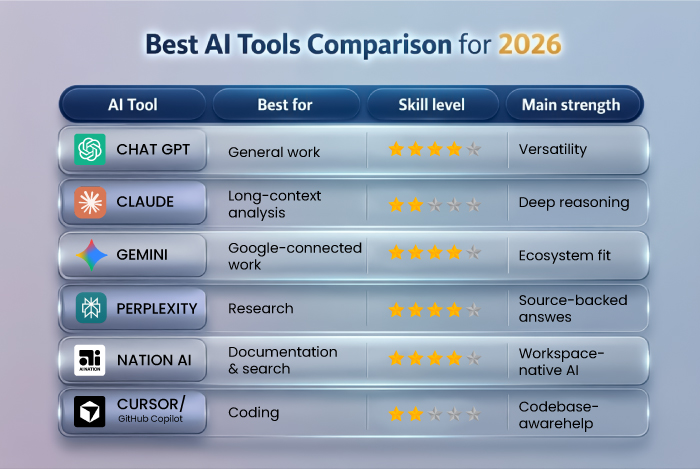 This visual has been created with the assistance of AI to simplify complex concepts and improve clarity.
Best AI Tools by User Type
Best AI tools for students
- Perplexity for research
- ChatGPT for explanation and drafting
- Gemini for Google-heavy study workflows
- Notion AI for notes and organization
Best AI tools for marketers
- ChatGPT for copy and ideation
- Canva Magic Studio for fast visual work
- Notion AI for planning and documentation
- Zapier for process automation
- Adobe Firefly for broader creative production
If you work in paid media and automation, it also helps to understand how AI is changing performance campaign execution.
Best AI tools for founders and operators
- ChatGPT for general decision support
- Claude for strategy and long docs
- Zapier for operational workflows
- Notion AI for internal systems
Best AI tools for developers
- Cursor for AI-native development
- GitHub Copilot for team coding support
- Claude for long-context reasoning and review
- ChatGPT for flexible coding help
Best AI tools for small businesses
- ChatGPT for general operations and customer-facing writing
- Zapier for workflow automation
- Canva Magic Studio for design
- Notion AI for internal systems
Best AI tools for creators
- ChatGPT for scripts and content ideas
- Canva Magic Studio or Adobe Firefly for visuals
- Synthesia for video
- Notion AI for planning and repurposing
Free vs Paid: What Actually Makes Sense?
Use free plans when you are testing the interface, your usage is light, you want to compare tools before committing, or you are still discovering your main use case.
Move to paid plans when:
- the tool becomes part of daily work
- you need stronger models or higher limits
- You rely on integrations or automation
- The time saved is clearly worth more than the cost
For most people, the right move is not “pay for everything.” It is “pay for the one or two tools that sit inside the workflow you repeat most.”
How to Build the Right AI Stack Without Overlap
A lot of people waste money by buying tools that do the same thing.
A simple no-overlap rule:
- Pick one main assistant: ChatGPT, Claude, or Gemini
- Pick one research layer: Perplexity
- Pick one workspace layer: Notion AI
- Pick one automation layer: Zapier
- Add a coding or creative layer only if your work needs it
That is usually enough. A stack should be complementary, not crowded.
A Practical Starter Stack
Best starter stack for most professionals
- ChatGPT
- Perplexity
- Notion AI
Best starter stack for business teams
- ChatGPT or Claude
- Zapier
- Notion AI
Best starter stack for developers
- Cursor or GitHub Copilot
- Claude or ChatGPT
Best starter stack for content and creative work
- ChatGPT
- Canva Magic Studio or Adobe Firefly
- Synthesia if video matters
Common Mistakes People Make
Buying too many tools too early
Most people need a stack, but not a huge one. Too many overlapping subscriptions usually create confusion.
Using one tool for everything
Different tools win at different jobs. Forcing one platform to do all the work usually leads to weaker results.
Ignoring automation
A lot of real value in 2026 comes from orchestration, not just content generation. That is why Zapier and workflow tools matter.
Skipping review and governance
The tools are better now, but outputs still need judgment, especially in customer-facing or strategic work. That is why safe AI use and data privacy still matter.
FAQ
What is the best AI tool for beginners?
For most beginners, ChatGPT is still the best starting point because it is the most flexible general-purpose tool and works across writing, planning, learning, and everyday support.
Which AI tool is best for research?
Perplexity is usually the best choice when the job is research first because it focuses on source-backed answers, deeper research workflows, and fast discovery.
Do I need more than one AI tool?
Usually, yes, but not many. The most practical setup is one main assistant, one research tool, and one workspace or automation layer. Anything beyond that should solve a very specific repeated need.
What is the difference between AI assistants and AI agents?
Assistants mainly help with thinking, writing, and summarizing. Agents go further by taking action across tools and workflows. In 2026, the line between them is getting thinner, but the distinction still matters.
Final Thoughts
The best AI tools in 2026 are not the ones with the most hype. They are the ones that remove repeated friction from real work.
That means the real shortlist is broader than the old chatbot conversation. ChatGPT, Claude, Gemini, and Perplexity still matter, but so do Notion AI, Cursor, GitHub Copilot, Zapier, Canva Magic Studio, Adobe Firefly, and Synthesia. Together, they reflect the real market in 2026: AI is not one product category anymore. It is a working stack.
For the broader framework behind these tools, go back to Artificial Intelligence in 2026: How It Works & Why It Matters. For the operational side, the next useful read is how to integrate AI into business workflows.