
Quick Answer: What Is Artificial Intelligence in 2026?
Artificial intelligence (AI) in 2026 is software that can learn from data, generate outputs, and automate workflows across systems.
- Analyze data and identify patterns.
- Generate content, code, and decisions
- Automate workflows across tools and platforms
In simple terms, AI is used to reduce manual work, improve decision-making, and increase output across business systems and daily tasks.
Introduction
Artificial intelligence is no longer a future concept. In 2026, it is part of how people work, search, create content, automate business tasks, build websites, and make decisions.
Instead of only defining artificial intelligence, this guide focuses on how AI works in real systems, where it delivers measurable results, and how businesses are actually using it today.
The conversation has shifted. People are not only asking what artificial intelligence is. They want to know:
- Which AI tools actually matter?
- Where AI is delivering real results?
- What risks exist?
- What is changing next?
AI is no longer limited to experiments or standalone tools. It is now built into:
- marketing systems
- customer support workflows
- ecommerce operations
- internal reporting
- product development
This guide explains what artificial intelligence is, how it works in real systems, which tools matter, where value is already visible, and how to start using it effectively.
What Is Artificial Intelligence?
Artificial Intelligence refers to systems that can perform tasks that normally require human thinking, such as understanding language, recognizing patterns, solving problems, and making decisions.
Artificial intelligence includes machine learning, natural language processing, computer vision, and generative AI systems.
According to IBM’s overview of artificial intelligence, AI enables computers and machines to simulate learning, comprehension, problem-solving, creativity, and autonomy.
In simple terms:
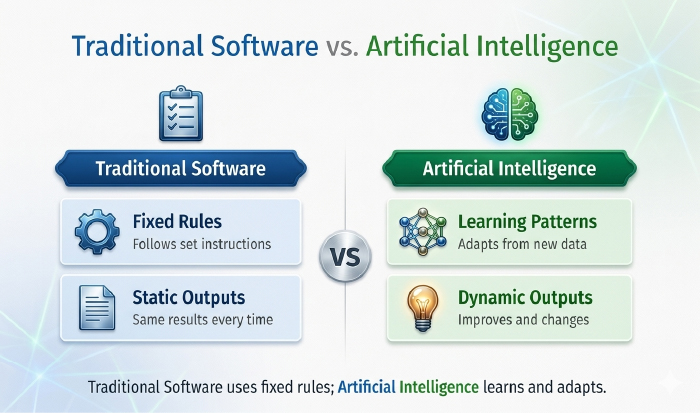
- Traditional software follows fixed instructions
- Artificial intelligence learns from patterns and adapts
That is what makes AI useful across modern workflows. It is not just about automation. It is about systems becoming more responsive, more predictive, and more capable of handling work that previously required manual judgment.
A broader view of this shift can be seen in how AI is already shaping business strategy and planning.
Core Technologies Behind Modern AI Systems
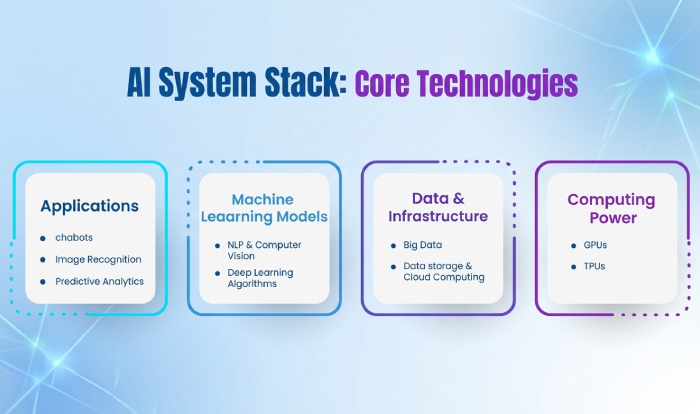
Modern AI systems are built on a combination of technologies that allow them to move beyond simple automation.
Large Language Models (LLMs)
Power systems that generate text, code, and structured outputs.
Natural Language Processing (NLP)
Enables systems to understand and respond to human language.
Embeddings and Vector Databases
Allow data to be stored and retrieved based on meaning rather than keywords.
Retrieval-Augmented Generation (RAG)
Combines real-time data retrieval with AI-generated responses to improve accuracy.
AI Agents and Workflow Automation Systems
Enable AI to execute multi-step processes across tools and platforms.
These technologies are what make modern AI systems capable of supporting real-world workflows such as automated lead management, AI-powered customer support, and intelligent reporting systems.
Types of Artificial Intelligence in 2026
Artificial intelligence is not one single technology. It includes several categories that serve different purposes.
Generative AI
Generative AI creates new outputs such as text, images, code, audio, and video. This is the most visible branch of AI right now because it directly affects writing, design, search, and creative production.
Machine Learning
Machine learning focuses on analyzing data and making predictions. It is widely used in recommendation systems, fraud detection, forecasting, and personalization.
Natural Language Processing
Natural Language Processing, or NLP, allows AI systems to understand and respond to human language. It powers tools like AI assistants, chatbots, and search interfaces.
Computer Vision
Computer vision helps systems understand images and visual input. It is used in areas like security, diagnostics, retail tracking, and image analysis.
Each type of AI serves a different function:
- Generative AI → creation
- Machine Learning → prediction
- NLP → communication
- Computer Vision → visual interpretation
How AI Is Used Today?
AI is now part of everyday workflows across multiple business functions. The strongest sign of maturity is that AI is no longer being used only as a standalone tool. It is being built into systems that people already rely on.
Content Creation
AI is used inside tools like ChatGPT, Jasper, and Notion AI to generate outlines, first drafts, summaries, scripts, and email copy. It reduces drafting time and increases speed. That is why content teams increasingly treat AI as part of production systems rather than a one-off writing shortcut.
Teams trying to balance speed with quality control often benefit from practical guidance on using generative AI in content workflows.
Web Development and Digital Production
AI now supports layout generation, code assistance, design planning, and optimization. This shift is visible in modern platforms where AI is built directly into the creation process, such as Elementor One.
Business Operations
Companies are using AI to handle repetitive admin work, streamline approvals, summarize activity, and support internal decisions. This is where AI starts moving from tool to system.
Many of these patterns are already visible in internal workflow automation.
Search and Research
AI is also changing how people gather information. Instead of manually opening multiple pages and pulling together answers, users increasingly rely on AI-powered summaries, conversational search, and guided outputs.
This matters because search behavior itself is changing. Users increasingly expect faster interpretation, not just faster retrieval.
Real AI Workflows in 2026
The strongest proof of AI’s importance is not the conversation around it. It is the fact that companies are already using it inside systems tied directly to revenue, response time, retention, and team efficiency.
These are not broad audience categories or theoretical use cases. They are real workflows already running inside businesses today.
Lead Routing and Qualification (AI Workflow Example)
One of the clearest real-world examples is automated lead handling.
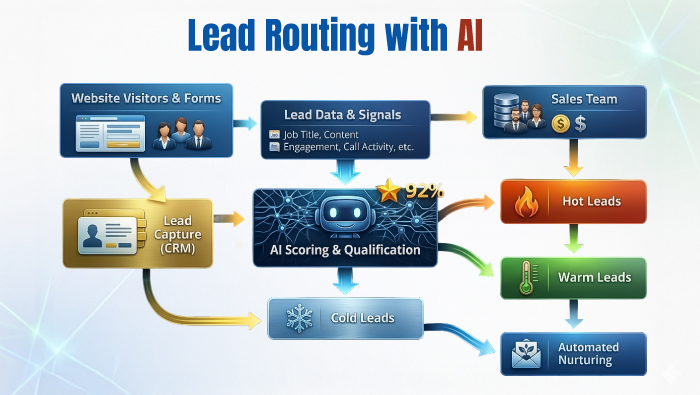
A typical workflow looks like this:
- A prospect submits a form through a website or paid ad
- The lead data is pushed into a CRM
- AI classifies the lead based on urgency, source, or intent
- A follow-up email or sales action is triggered automatically
This is not a niche setup. Zapier’s March 2026 analysis of 10,000 AI-powered workflows found that lead management is one of the most common use cases, with a significant share of workflows focused on improving lead systems.
The commercial impact is clear. Sales teams still lose time to administrative tasks, and HubSpot’s sales automation data shows that reps spend only a limited portion of their time actively selling. This gap is exactly why AI-assisted lead routing and qualification are being adopted so quickly.
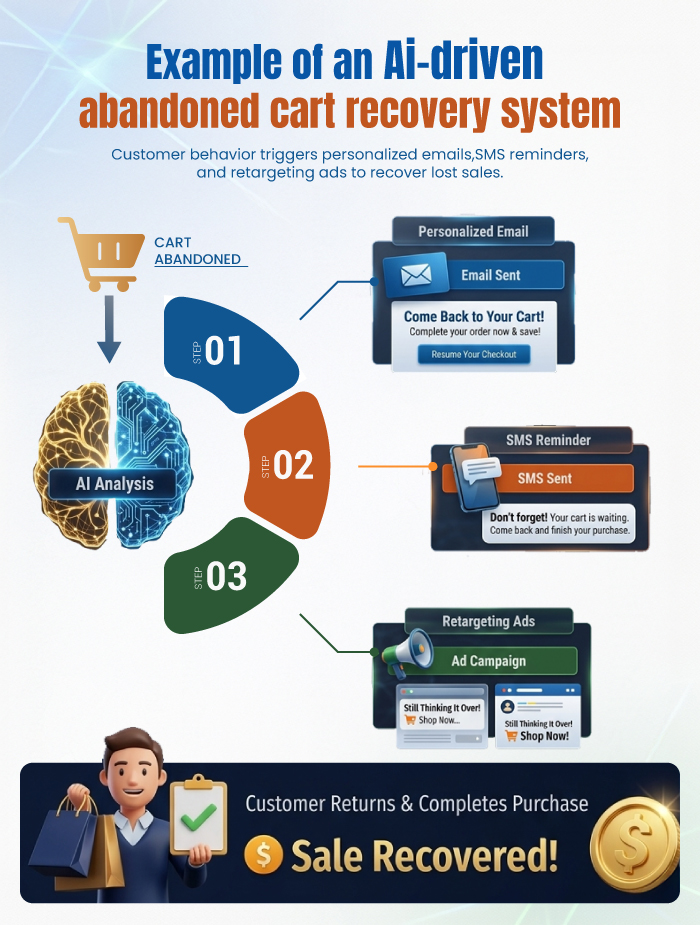
E-commerce Abandoned Cart Recovery
E-commerce is another area where AI is already tied to measurable revenue.
One of the most practical examples is abandoned-cart recovery.
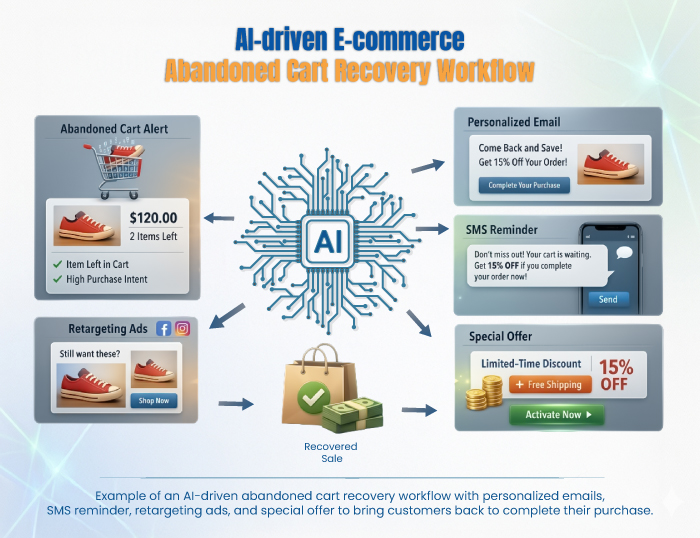
A standard workflow:
- A shopper adds products to the cart but leaves before checkout
- The system detects abandonment
- AI helps tailor the reminder message
- The message is sent based on behavior, timing, or cart value
This is now a core part of e-commerce operations. Shopify highlights Klaviyo benchmark data showing that abandoned-cart emails recover an average of 3.33% of lost sales and generate $3.65 per recipient.
Even small improvements in recovery rates can lead to meaningful revenue gains at scale, which is why this workflow is widely implemented across online stores.
That makes cart recovery one of the clearest examples of AI-supported automation producing direct commercial value. A wider view of this shift is visible in how AI is being used in e-commerce personalization.
Marketing Content Operations
Marketing teams are no longer using AI only for brainstorming. In many teams, the workflow now looks like this:
- A campaign brief enters the planning system
- AI generates first-draft variations.
- Marketers review, edit, and approve.
- Final assets move into publishing or campaign systems.
This is already normal enough that HubSpot’s 2026 marketing statistics say over 80% of marketers are using AI for content creation. That matters because it shifts AI from novelty to infrastructure. It is not being used only for idea generation. It is being used to keep output moving at scale.
Customer Support and Ticket Triage
Customer operations are one of the most developed areas of AI adoption.
Businesses are now using AI to:
- Answer repetitive customer questions
- Summarize conversations
- Route tickets to the right teams
- Escalate only complex issues to human agents
This improves both speed and efficiency. Zapier’s analysis of AI in customer service highlights faster response times, always-on support, and reduced workload for support teams.
This is one of the strongest use cases because it impacts both customer experience and operational costs at the same time.
Internal Reporting and Decision Support
Another important workflow is AI-assisted reporting.
Instead of manually collecting updates from multiple dashboards, AI is used to:
- Summarize data from different systems
- Highlight trends and anomalies
- Generate clear, readable reports
McKinsey’s State of AI research supports this shift, showing that high-performing organizations are more likely to build structured processes around how AI outputs are reviewed and used.
That distinction matters. Effective AI reporting is not just fast. It is reliable, structured, and tied to real decision-making.
AI is no longer limited to isolated tasks. It is becoming part of how businesses operate, manage information, and make decisions at scale.
AI Maturity Framework: From Tools to Full System Automation
This framework explains how AI adoption evolves from simple tools to fully automated systems across business operations. To understand how artificial intelligence creates real business value, it helps to look at how companies adopt AI over time.
Most organizations move through three clear stages:
Level 1: AI as a Tool (Task-Based Usage)
At this stage, AI is used for individual tasks.
Examples:
- writing content drafts
- summarizing documents
- generating emails
AI improves speed, but it is not connected to other systems.
Level 2: AI in Workflows (Process Integration)
At this stage, AI is integrated into multi-step workflows across tools.
Examples:
- content production pipelines (brief → draft → edit → publish)
- automated lead handling (form → CRM → classification → follow-up)
AI begins to support processes, not just tasks.
This is where many businesses currently operate, especially those building AI-driven workflow automation systems.
Level 3: AI as a System (End-to-End Automation)
At this stage, AI powers complete systems that run with minimal manual input.
Examples:
- lead-to-sale systems
- customer support ecosystems
- ecommerce revenue recovery systems
AI continuously processes data, triggers actions, and improves outcomes.
Why This Framework Matters?
Most businesses are still operating between Level 1 and Level 2.
The real competitive advantage comes at Level 3, where AI is not just assisting work but running core business systems.
Understanding this progression helps teams:
- Identify where they currently stand
- Prioritize the next level of AI adoption
- Focus on measurable business impact instead of isolated use cases
AI by Industry in 2026 (Real Systems and Workflows)
Artificial intelligence is no longer adopted in the same way across all sectors. In 2026, its role depends on the business model, the workflow, and the commercial goal.
What remains consistent is this: AI is moving from isolated use to being embedded inside systems that directly affect performance.
Marketing (Real Campaign Systems)
Marketing teams are using platforms like HubSpot, Google Ads, and Meta Ads Manager, where AI continuously analyzes campaign performance and adjusts execution in real time.
A working system looks like this:
- Campaign data flows into the platform
- AI identifies underperforming creatives and audiences
- targeting, budget allocation, and messaging are adjusted
- Follow-up email sequences are triggered automatically
This allows teams to optimize campaigns daily instead of relying on delayed reporting cycles. AI is directly influencing performance, not just supporting content creation.
The same shift is visible in areas like PPC optimization and long-term marketing planning.
E-commerce (Revenue and Conversion Systems)
E-commerce businesses are using AI inside platforms like Shopify, combined with Klaviyo, to recover revenue and improve conversion rates.
A real system works like this:
- a user browses or abandons checkout
- The system tracks behavior.
- AI determines the best timing, and message
- recovery emails or SMS flows are triggered automatically
These systems are responsible for measurable revenue recovery. Klaviyo benchmark data shows abandoned-cart flows generating consistent return per recipient, making this one of the most commercially valuable AI implementations.
AI is also used for:
- product recommendations
- dynamic merchandising
- personalized shopping journeys
That broader shift is also reflected in how AI supports e-commerce personalization and chatbot-driven e-commerce sales.
Customer Operations (AI-First Support Systems)
Customer support teams are using tools like Intercom and Zendesk AI to manage high volumes of queries without increasing team size.
A typical workflow:
- A customer submits a query
- AI provides an instant response for common questions. The issue is summarized automatically.
- Complex cases are routed to human agents.
This improves response speed and reduces support load. AI handles repetitive volume, while human agents focus on complex interactions.
Business Operations (Workflow Automation Systems)
AI is embedded into internal operations using tools like Zapier, Make, and Notion AI.
A real workflow:
- Data is pulled from CRM, analytics, and support tools
- AI summarizes performance across systems.
- Anomalies and trends are highlighted
- Reports are generated automatically
This replaces manual reporting cycles and allows faster decision-making. AI is now part of how operational systems function.
Software and Product Teams (AI-Assisted Development)
Engineering teams are using tools like GitHub Copilot to speed up development workflows.
A practical workflow:
- Developers write initial prompts or partial code
- AI generates functions and boilerplate
- bugs are identified and fixed faster
- Documentation is generated alongside code
This reduces repetitive work and allows engineers to focus on higher-level problem-solving and system design.
Across all industries, the pattern is the same: AI is no longer supporting systems. It is becoming part of how those systems operate.
Benefits of Artificial Intelligence
Artificial intelligence is being adopted at scale because it improves how systems perform, not just how tasks are completed.
Faster Execution Across Systems
AI reduces the time required for drafting, sorting, responding, and summarizing.
For example, in marketing workflows, AI-generated drafts allow teams to move from idea to execution in hours instead of days. In customer support, AI responses reduce wait times by handling repetitive queries instantly.
Higher Output Without Linear Hiring
AI allows teams to increase output without scaling headcount at the same pace.
Content teams can produce more campaigns, support teams can handle higher ticket volumes, and sales teams can process more leads because AI removes bottlenecks in early-stage work.
Consistency in Repetitive Workflows
AI improves consistency in tasks like:
- formatting reports
- classifying leads
- generating first drafts
- handling basic customer queries
For example, CRM systems using AI-based lead scoring apply the same evaluation logic across thousands of leads, reducing inconsistency caused by manual review.
Better Use of Internal Data
AI becomes significantly more valuable when applied to existing business data.
In reporting workflows, AI can analyze CRM records, support tickets, and performance metrics to produce summaries that would otherwise take hours to compile manually.
This allows teams to move from raw data to actionable insights much faster.
Limitations of Artificial Intelligence
Despite its value, AI has clear limitations that affect how it should be used in real systems.
Limited Context Understanding
AI can process patterns and generate fluent responses, but it does not fully understand context.
In customer support systems, this can lead to responses that sound correct but miss the nuance of a user’s issue, which is why escalation to human agents remains necessary.
Confident but Incorrect Outputs
AI systems can generate incorrect information with high confidence.
In content workflows, this can lead to factual errors if outputs are not reviewed. This is why most teams use AI for first drafts, not final publishing.
Dependence on Data Quality
AI outputs depend heavily on the quality of input data.
In CRM systems, poor or incomplete data can lead to incorrect lead scoring or misclassification, which affects downstream sales processes.
Does Not Replace Strategic Decision-Making
AI supports execution but does not replace judgment.
In marketing, AI can suggest optimizations, but campaign strategy, positioning, and messaging direction still require human decision-making.
Risks and Challenges of AI
Beyond limitations, AI introduces risks that need to be actively managed.
Accuracy Risk in Automated Systems
When AI is integrated into workflows, errors can scale quickly.
For example, incorrect responses in support systems or flawed outputs in reporting workflows can affect customer experience and decision-making if not reviewed.
Data Privacy and Compliance Risk
AI systems often process customer data, internal records, and behavioral inputs.
This makes data governance critical. Businesses must control:
- How data is collected
- where it is stored
- How it is used in AI systems
Failure to manage this properly can create compliance and trust issues.
Bias in Automated Decision Systems
AI systems can reflect biases present in training data.
In areas like hiring, customer scoring, or segmentation, this can lead to unfair or inaccurate outcomes if not monitored.
Over-Reliance on Automation
AI works best as part of a structured system.
When businesses rely on it without proper oversight, it can create fragile workflows where errors go unnoticed and decision quality declines.
AI Ethics and Regulation
As artificial intelligence becomes embedded in business systems and public infrastructure, ethics and regulation are no longer optional. They are essential to how AI is designed, deployed, and governed.
The focus is shifting from capability to responsibility.
Transparency in AI Systems
Users and organizations increasingly need visibility into how AI systems operate.
This includes:
- knowing when AI is being used
- understanding how outputs are generated
- identifying what data is being processed
Transparency builds trust and allows users to make informed decisions when interacting with AI-driven systems.
Accountability and Responsibility
AI does not remove responsibility from organizations.
If an AI-assisted system produces incorrect, harmful, or biased outcomes:
- The organization remains accountable
- Clear ownership structures must exist
- Review and escalation processes must be defined
AI tools support decisions, but they do not replace accountability.
Data Privacy and User Consent
AI systems often rely on sensitive data, including:
- user inputs
- customer records
- internal business information
This makes privacy and compliance critical.
Responsible AI implementation requires:
- clear user consent
- secure data storage
- controlled access
- compliance with data protection regulations
Privacy is not a technical detail. It is a core part of system design.
Responsible Use and Decision Boundaries
The key ethical question has shifted.
It is no longer only:
- Can this be automated
It is also:
- Should this be automated
Some decisions require:
- human judgment
- contextual understanding
- ethical consideration
Responsible AI use depends on recognizing where automation should stop.
What’s Changing Next in AI
AI is continuing to evolve, but the direction of change is becoming clearer.
The next phase is defined less by new tools and more by how AI is integrated into systems.
AI Embedded Into Everyday Platforms
AI is increasingly being built into the tools people already use.
Instead of switching between separate applications:
- Users interact with AI inside existing platforms
- workflows become more seamless
- AI becomes part of the default experience
This reduces friction and increases adoption.
Shift From Task Automation to System Automation
AI is moving beyond individual tasks and into full workflow support.
This includes:
- reporting systems
- onboarding processes
- lead management systems
- internal operations
The focus is no longer on isolated efficiency gains. It is on improving how entire systems function.
Growing Demand for Governance and Oversight
As AI adoption increases, expectations around control and accountability are rising.
Organizations are placing more emphasis on:
- validation processes
- output review systems
- data governance
- compliance frameworks
Speed without oversight creates risk. Structured governance is becoming a requirement, not an option.
Clear Separation Between Real Value and Weak Use Cases
The next stage of AI adoption will separate meaningful use cases from low-impact ones.
Businesses are shifting from:
- “Are we using AI?”
to:
- “Is AI improving measurable outcomes?”
This distinction will define long-term value.
How to Start Using AI Thoughtfully
The most effective approach to AI adoption is focused and practical.
Instead of applying AI everywhere at once, start with one clear use case.
Ask:
- Which repetitive task creates the most friction
- Where time is consistently lost
- Which workflow would improve with faster drafts or summaries
- Where human review must remain central
Strong AI implementation begins with a single workflow that delivers measurable improvement. It can then expand gradually.
Frequently Asked Questions About Artificial Intelligence
What is artificial intelligence in simple terms?
Artificial intelligence is software that can learn from data and perform tasks that normally require human thinking.
It includes abilities like understanding language, recognizing patterns, generating content, and making decisions. Unlike traditional software, AI improves its outputs based on data and usage over time.
How is artificial intelligence used in business?
Artificial intelligence is used in business to automate workflows, improve decision-making, and increase operational efficiency.
Common use cases include:
- lead qualification and routing in CRM systems
- content generation and campaign optimization
- ecommerce personalization and recommendations
- customer support automation and ticket handling
- internal reporting and data analysis
Most businesses use AI inside existing platforms to reduce manual work and improve outcomes.
What are the main benefits of artificial intelligence?
The main benefits of artificial intelligence are speed, scalability, consistency, and better use of data.
AI helps organizations:
- complete tasks faster
- increase output without proportional hiring
- Maintain consistency in repetitive processes
- turn large datasets into actionable insights
These benefits are strongest when AI is integrated into workflows rather than used as a standalone tool.
What are the limitations of artificial intelligence?
Artificial intelligence has limitations such as limited context understanding, possible inaccuracies, and dependence on data quality.
AI systems can produce confident but incorrect outputs and may miss nuance in complex situations. They also cannot replace human judgment in strategic or sensitive decisions, which is why human oversight remains essential.
What are the risks of using artificial intelligence?
The main risks of artificial intelligence include accuracy issues, data privacy concerns, bias, and over-reliance on automation.
These risks can lead to incorrect decisions, exposure of sensitive data, or unfair outcomes if systems are not properly monitored. Strong governance, validation processes, and data controls are required to manage these risks.
Is artificial intelligence replacing jobs?
Artificial intelligence is changing how work is done rather than fully replacing jobs.
AI automates repetitive and time-consuming tasks, allowing human roles to focus more on strategy, decision-making, and oversight. While some roles may evolve, new roles are also being created around managing and implementing AI systems.
How can beginners start using artificial intelligence?
Beginners should start by applying AI to one specific task or workflow.
A practical approach is:
- Identify a repetitive or time-consuming task
- Use AI to assist or automate that task
- review and improve the output
- expand gradually into other workflows
This makes AI adoption easier to manage and more effective over time.
Artificial Intelligence Is Now an Operational Advantage
Artificial Intelligence in 2026 is not important because it is new.
It is important because it is already embedded in systems that influence:
- revenue
- operations
- customer experience
- decision-making
- output and efficiency
The shift is clear.
AI is no longer something businesses experiment with occasionally.
It is part of how modern systems are designed and how work gets done at scale.
The real question is no longer whether artificial intelligence matters.
It is:
- where it creates measurable value
- where it introduces risk
- how effectively it is implemented
Businesses that treat AI as a system-level capability will gain a clear advantage.
Those who treat it as a standalone tool will struggle to see consistent results.
What to Do Next
The most effective way to start is simple:
- Identify one workflow that takes time or creates friction
- Apply AI to assist or automate part of that process
- Review the output and refine it
- Expand gradually into connected workflows
This is how AI moves from a tool to a system.
Organizations that follow this approach build practical, scalable AI systems that deliver real results, not just experimentation.