
Quick Takeaways
AI automation does not have to be expensive, technical, or enterprise-level. In 2026, small businesses can use affordable AI tools and no-code workflows to reduce repetitive work, respond faster, organize admin tasks, and support marketing, sales, customer service, finance, and reporting.
- Start With One Repetitive Workflow
- Use Tools That Connect To Existing Apps
- Keep Human Approval For Customer, Payment, And Sensitive Tasks
- Track Time Saved Before Expanding
- Avoid Over-Automating Too Early
- Protect Customer And Business Data From The Start
- Add Basic AI Governance Before Automating High-Risk Workflows
Quick Answer: What Is Low-Budget AI Automation?
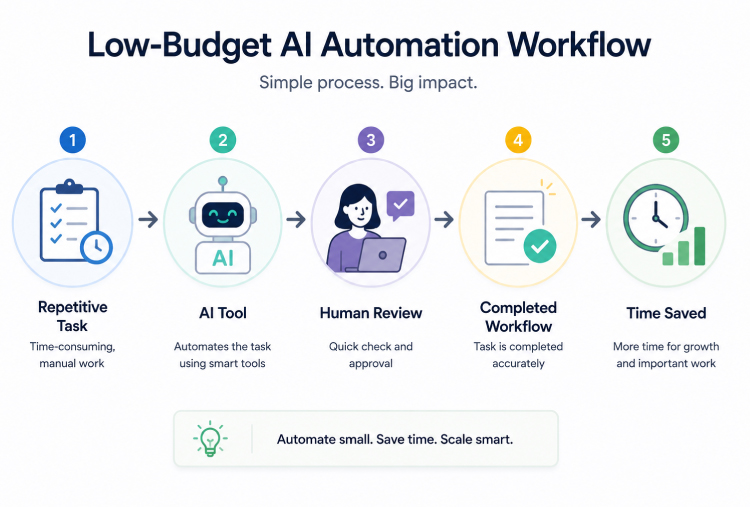
Low-budget AI automation means using affordable AI tools, no-code platforms, and simple workflows to reduce manual tasks without hiring developers or rebuilding business systems.
For small businesses, this usually means connecting AI to everyday tools like email, calendars, spreadsheets, CRMs, helpdesks, accounting tools, forms, and messaging apps. The goal is simple: save time on repeatable work while keeping people in control of important decisions.
This topic connects closely with AI workflow integration because the strongest automation starts with a real workflow, not a random tool.
(This AI-assisted visual is for illustrative and educational purposes only.)
Why Small Businesses Should Care About AI Automation In 2026
Small businesses often face the same operational pressure as larger companies, but with fewer people, smaller budgets, and less time to experiment. That is why AI automation matters. It can help small teams handle repetitive work without adding more admin load.
The market is clearly moving in this direction. Zapier positions itself around AI workflows and agents across 9,000+ apps, showing how no-code automation is becoming more accessible to smaller teams. Anthropic also launched Claude for Small Business in May 2026, designed to work inside tools many small businesses already use, including QuickBooks, PayPal, HubSpot, Canva, DocuSign, Google Workspace, and Microsoft 365.
That does not mean every small business needs advanced AI agents right away. It means the opportunity is becoming more practical. Small teams can now automate specific workflows instead of trying to build complex AI systems from scratch.
For a broader context, this also fits into how artificial intelligence in 2026 is shifting from standalone tools into everyday business systems.
1. Start With One Workflow, Not A Full AI Stack
The biggest mistake small businesses make is trying to automate everything at once.
A better starting point is one workflow that is:
- Repetitive
- Time-Consuming
- Easy To Measure
- Low-Risk
- Already Done The Same Way Every Week
Good first workflows include:
- Replying To Common Customer Questions
- Summarizing Meeting Notes
- Sending Appointment Reminders
- Creating First-Draft Social Posts
- Organizing New Leads
- Extracting Data From Forms
- Preparing Weekly Reports
The first automation should save time quickly. It should not require a major rebuild, a new department, or months of training.
2. Use The Tools You Already Have
Low-budget AI automation works best when it connects to tools the business already uses.
For many small businesses, that includes:
- Gmail Or Outlook
- Google Sheets Or Excel
- Google Calendar Or Microsoft Calendar
- HubSpot Or Zoho CRM
- QuickBooks Or Accounting Software
- WhatsApp Or Slack, or Microsoft Teams
- Canva Or Design Tools
- Forms And Booking Tools
A simple example: when someone fills out a website form, the workflow can add the lead to a spreadsheet or CRM, summarize the request, draft a reply, and notify the right person. A human can still review the response before it is sent.
This is the real value of low-budget automation. It does not replace the team. It removes small delays between tools.
3. Automate Customer Support Without Losing The Human Touch
Customer support is one of the easiest places to start because many questions are repeated.
AI automation can help with:
- FAQ Responses
- Ticket Summaries
- Order Status Questions
- Appointment Questions
- Basic Product Information
- Complaint Routing
- Follow-Up Drafts
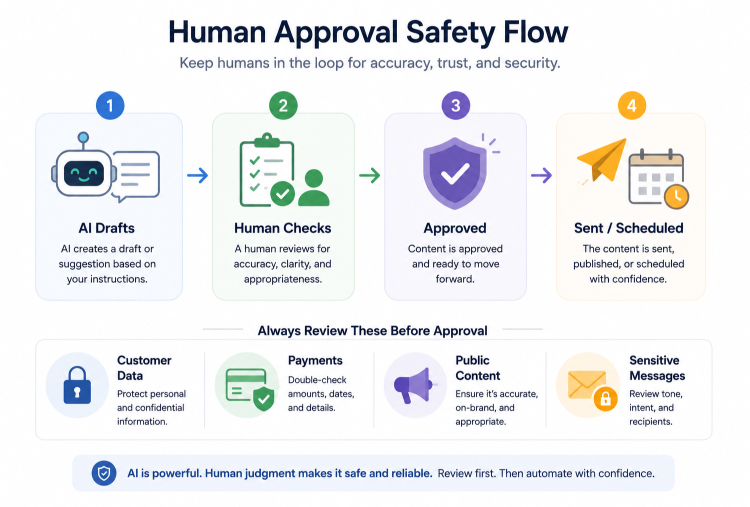
A small business does not need to hand every customer conversation to AI. A safer setup is:
- AI Drafts The Reply
- Human Reviews The Reply
- Customer Receives A Faster Response
- Complex Issues Are Escalated
This keeps support fast without making it feel robotic. It also connects with how AI is changing customer experience, especially for businesses that want better response speed without hiring a large support team.
4. Automate Lead Capture And Sales Follow-Ups
Many small businesses lose sales because leads are not followed up on quickly or consistently.
AI automation can help with:
- Lead Form Summaries
- CRM Updates
- First Follow-Up Drafts
- Lead Tagging
- Appointment Reminders
- Sales Call Notes
- Proposal Drafts
For example, when a potential customer submits a form, automation can create a CRM record, summarize the request, tag the lead by service type, and draft a follow-up email. The owner or sales rep can review and send it.
Salesforce’s guide to AI tools for small businesses highlights AI use across sales, marketing, service, and CRM, which reflects how common these workflows have become for smaller teams.
5. Use AI For Marketing And Content Repurposing
Marketing is another high-value area for low-budget automation because small teams often need consistent content but do not have dedicated writers, designers, and strategists.
AI can help with:
- Blog Outlines
- Social Captions
- Email Drafts
- Newsletter Summaries
- Product Descriptions
- Ad Variations
- Short Video Script Ideas
- Content Repurposing
A practical workflow could look like this:
- Record A Webinar Or Meeting
- Use AI To Summarize Key Points
- Turn The Summary Into A Blog Outline
- Create Three Social Post Drafts
- Draft A Newsletter Section
- Review Everything Before Publishing
This connects naturally with generative AI content workflows. AI can speed up content production, but the final version still needs human editing, source checking, and brand voice control.
6. Automate Admin Work That Slows The Team Down
Small business owners lose a lot of time to small admin tasks. AI automation can reduce that load.
Useful admin workflows include:
- Meeting Note Summaries
- Task Creation From Notes
- Calendar Reminders
- Invoice Follow-Ups
- Document Summaries
- Internal SOP Drafts
- Form Response Organization
- Email Sorting
For example, after a client meeting, AI can summarize the notes, pull out action items, create a task list, and draft a follow-up email. The team still approves the final message, but the admin work becomes much faster.
This is the kind of automation that quietly saves hours every week.
7. Use AI For Simple Finance And Invoice Workflows
Finance workflows need more care because they involve money, customer records, and business data. Still, AI can support low-risk parts of the process.
AI automation can help with:
- Invoice Data Extraction
- Payment Reminder Drafts
- Expense Categorization
- Receipt Organization
- Monthly Summary Drafts
- Cash Flow Notes
A safe setup requires approval from a person. AI can prepare the work, but payments, refunds, payroll, and financial decisions should not be fully automated without review.
Anthropic’s Claude for Small Business announcement points to workflows like invoice chasing, payroll planning, and month-end support inside tools small businesses already use. The important part is that the business still approves key actions before anything is sent, posted, or paid.
8. Build Simple Reporting Workflows
Reporting often feels bigger than it is because data is scattered across tools.
AI automation can help summarize:
- Weekly Sales
- Marketing Results
- Support Volume
- Customer Feedback
- Project Updates
- Lead Sources
- Website Metrics
A basic workflow might pull numbers from a spreadsheet, summarize the changes, highlight unusual patterns, and draft a weekly update for the owner or manager.
The value is not just speed. It helps small businesses make decisions based on clearer information instead of scattered notes and late-night guesswork.
9. Keep Privacy And Data Rules Clear
Small businesses should treat data privacy seriously from the beginning.
Before using AI automation, define what data can and cannot be entered into AI tools.
Be careful with:
- Customer Records
- Payment Details
- Passwords
- Legal Documents
- Health Information
- Employee Data
- Confidential Client Files
- Internal Strategy Documents
OpenAI’s business data privacy guidance says business data from ChatGPT business products and the API is not used to train models by default. Policies like this matter when choosing AI tools for client work, customer communication, and internal operations.
This also connects with AI data privacy because automation becomes riskier when sensitive data moves across tools without clear rules.
10. Add Basic Governance Before Automating Risky Workflows
Small businesses do not need a large AI committee, but they do need basic rules before automation touches customer data, payments, financial records, public content, or sensitive communication.
Basic governance should define:
- Which Tools Are Approved
- What Data Can Be Used
- Who Reviews Outputs
- Which Tasks Need Human Approval
- What Should Never Be Automated
- How Errors Are Reported
- How A Workflow Can Be Paused Or Turned Off
For any workflow involving customer data, payments, or automated actions, basic AI governance should be in place before the workflow expands.
11. Keep Humans In The Loop
Low-budget automation should still have human control.
Keep human approval for:
- Customer Complaints
- Refunds And Payments
- Legal Or Financial Decisions
- Public Content
- Hiring Or HR Decisions
- Sensitive Customer Messages
- High-Value Sales Replies
A good structure is:
- AI Summarizes, Human Decides
- AI Drafts, Human Sends
- AI Tags, Human Reviews
- AI Flags, Human Escalates
This gives small businesses the benefit of automation without giving up judgment, accountability, or customer trust.
(This AI-assisted visual is for illustrative and educational purposes only.)
12. Track ROI Before Adding More Automations
AI automation should save time, reduce errors, improve speed, or support revenue. If it does none of those, it is just another tool.
Track simple metrics:
- Time Saved Per Week
- Manual Tasks Reduced
- Faster Response Times
- Fewer Missed Leads
- Fewer Admin Errors
- More Consistent Follow-Ups
- Better Reporting Speed
Start with one metric. If the automation saves time or improves quality, keep it. If not, adjust or remove it.
Low-Budget AI Automation Workflow Examples
Here are practical examples small businesses can start with.
Customer Inquiry Workflow
- Customer Fills Out A Form
- AI Summarizes The Request
- Lead is added to the CRM Or Sheet
- Follow-Up Email Is Drafted
- Human Reviews And Sends
Meeting Follow-Up Workflow
- Meeting Is Recorded Or Transcribed
- AI Summarizes Key Points
- Tasks Are Created
- Follow-Up Email Is Drafted
- Team Reviews Before Sending
Social Content Workflow
- Blog Or Offer Is Added
- AI Creates Caption Drafts
- AI Suggests Email Summary
- Human Edits For Brand Voice
- Content Is Scheduled
Invoice Follow-Up Workflow
- Invoice Due Date Is Tracked
- AI Drafts Reminder
- Business Owner Reviews
- Reminder Is Sent
- Payment Status Is Updated
Weekly Reporting Workflow
- Data is pulled from the sheet or CRM
- AI Summarizes Trends
- Issues Are Flagged
- Weekly Report Is Drafted
- Owner Reviews The Summary
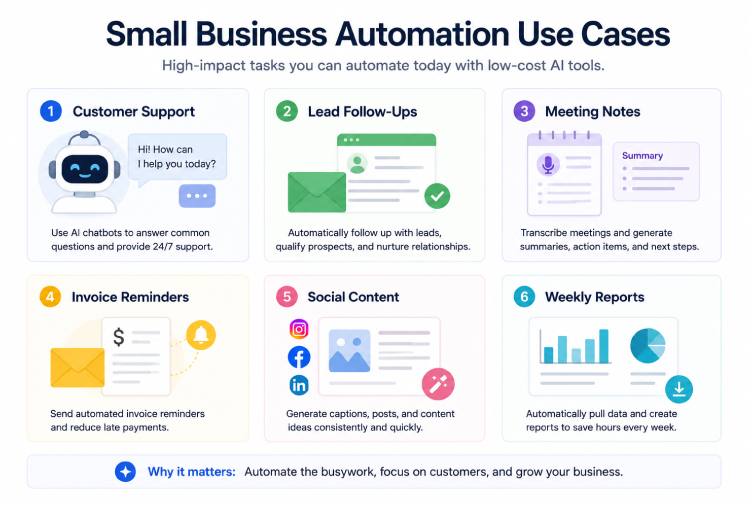
What To Automate First
The best first automation is usually the task that happens often and annoys the team most.
Good first choices include:
- Lead Follow-Ups
- Meeting Notes
- FAQ Replies
- Appointment Reminders
- Weekly Reports
- Invoice Reminders
- Social Content Drafts
Avoid starting with high-risk workflows like payroll decisions, hiring decisions, legal responses, customer refunds, or anything involving sensitive customer data without human review.
(This AI-assisted visual is for illustrative and educational purposes only.)
Common Mistakes Small Businesses Make With AI Automation
Avoid these mistakes:
- Automating Too Many Things At Once
- Using Tools That Do Not Connect
- Skipping Human Review
- Putting Sensitive Data Into Unapproved Tools
- Buying Expensive Platforms Too Early
- Measuring Tool Usage Instead Of Time Saved
- Letting AI Send Customer Messages Without Review
- Forgetting To Train The Team
- Keeping Automations That No Longer Help
Most automation failures happen because the workflow was unclear, the data was messy, or the team did not trust the process.
AI Automation Checklist For Small Businesses
Before launching an AI automation, check:
- Does It Solve A Real Repetitive Task?
- Is The Workflow Low-Risk?
- Does It Connect To Existing Tools?
- Is The Data Safe To Use?
- Is Human Review Included?
- Is There One Clear Owner?
- Can The Result Be Measured?
- Can The Workflow Be Turned Off If Needed?
- Does The Team Understand How To Use It?
FAQs About Low-Budget AI Automation
What Is The Best AI Automation For Small Businesses?
The best first automation is usually a repetitive, low-risk workflow such as lead follow-ups, meeting summaries, FAQ replies, appointment reminders, or weekly reporting.
Do Small Businesses Need Developers For AI Automation?
Not always. Many small businesses can start with no-code or low-code tools that connect email, calendars, spreadsheets, CRMs, forms, and AI assistants.
Is AI Automation Expensive?
It does not have to be. Many small businesses start with affordable tools they already use, then add automation gradually. The key is to prove time savings before adding more paid tools.
What Should Small Businesses Not Automate?
Small businesses should avoid fully automating high-risk decisions such as refunds, payments, hiring, legal advice, health guidance, or sensitive customer communication without human review.
How Do You Measure AI Automation ROI?
Start with simple metrics such as time saved, faster response times, fewer missed leads, fewer manual errors, or more consistent follow-ups.
Is AI Automation Safe For Customer Data?
It can be safe when businesses use approved tools, understand vendor privacy terms, avoid entering sensitive data into unapproved platforms, and keep human review in place.
Final Thoughts
Low-budget AI automation in 2026 is not about replacing people or building complex systems. It is about removing repetitive work so small teams can respond faster, stay organized, and spend more time on work that actually needs human judgment.
The best approach is simple:
- Pick One Repetitive Workflow
- Use Tools Already In The Business
- Keep Humans In Control
- Measure Time Saved
- Expand Only When It Works
Small businesses do not need to automate everything. They only need to automate the right workflows, prove the value, and scale gradually. That is how AI automation becomes useful without becoming expensive, risky, or overwhelming.