


Quick Takeaways
AI agents are becoming one of the biggest business AI shifts in 2026 because they go beyond simple chat responses. Instead of only answering questions, they can follow goals, use tools, retrieve information, trigger actions, and support multi-step workflows.
- AI Agents Complete Multi-Step Tasks
- AI Agents Are Different From Basic Chatbots
- Business Use Cases Include Support, Sales, Operations, Reporting, And Internal Knowledge
- Human Review And Governance Are Essential
- The Best Starting Point Is One Low-Risk Workflow
- AI Agents Should Improve Workflows, Not Create New Complexity
Quick Answer: What Are AI Agents?
AI agents are AI systems that can work toward a goal by understanding context, planning steps, using tools, retrieving information, and taking actions across business systems. A chatbot mainly responds to a user. An AI agent can support a workflow.
For example, a customer support chatbot may answer a question from a help center. A customer support agent can check the customer’s issue, summarize the conversation, search internal documentation, suggest a response, route the ticket, and escalate complex cases to a human.
That difference is why AI agents matter. They are not just another version of AI chat. They are part of the next layer of artificial intelligence in 2026.
Why AI Agents Matter For Businesses In 2026
Businesses are moving from AI tools that assist with single tasks to AI agents that can support connected workflows. Google Cloud’s 2026 AI agent trends report describes agents as part of a shift from one-off prompts to workflow systems, with examples across customer service, code quality, and threat detection.
OpenAI is also positioning enterprise AI around production-ready agents. OpenAI Frontier is described as an enterprise platform for deploying secure agents that integrate with systems of record and automate core workflows across use cases such as revenue operations, customer support, procurement, financial forecasting, and software engineering.
This matters because many business problems are not single-task problems. A slow sales process, messy support queue, or delayed internal report usually involves several steps, tools, people, and decisions. AI agents can help reduce the manual handoffs between those steps.
That is also why agents connect closely with AI workflow integration. The value is not just the agent itself. The value comes from how well it fits into the workflow.
AI Agents vs Chatbots vs AI Tools
The easiest way to understand AI agents is to compare them with tools businesses already know.
AI Tools
An AI tool usually helps with one task. It may write a draft, summarize a meeting, generate an image, analyze a file, or answer a question.
Examples include:
- Writing Assistants
- AI Research Tools
- Meeting Summary Tools
- Image Generation Tools
- Code Assistants
Many of these are still useful. In fact, most businesses should understand the best AI tools for daily work before moving into more advanced agent workflows.
Chatbots
A chatbot mainly handles conversation. It responds to user questions, provides information, and guides users through basic interactions.
Chatbots are useful for:
- FAQs
- Simple Customer Support
- Lead Capture
- Basic Website Assistance
- Internal Helpdesk Questions
AI Agents
AI agents go further because they can support multi-step work. They may access tools, follow rules, retrieve business data, trigger actions, and hand off to humans when needed.
AI agents are useful for:
- Ticket Routing
- Lead Qualification
- Customer Follow-Ups
- Internal Research
- Report Generation
- Workflow Automation
- Knowledge Retrieval
The difference is simple: an AI tool helps with a task, a chatbot answers or talks, and an AI agent supports a workflow.
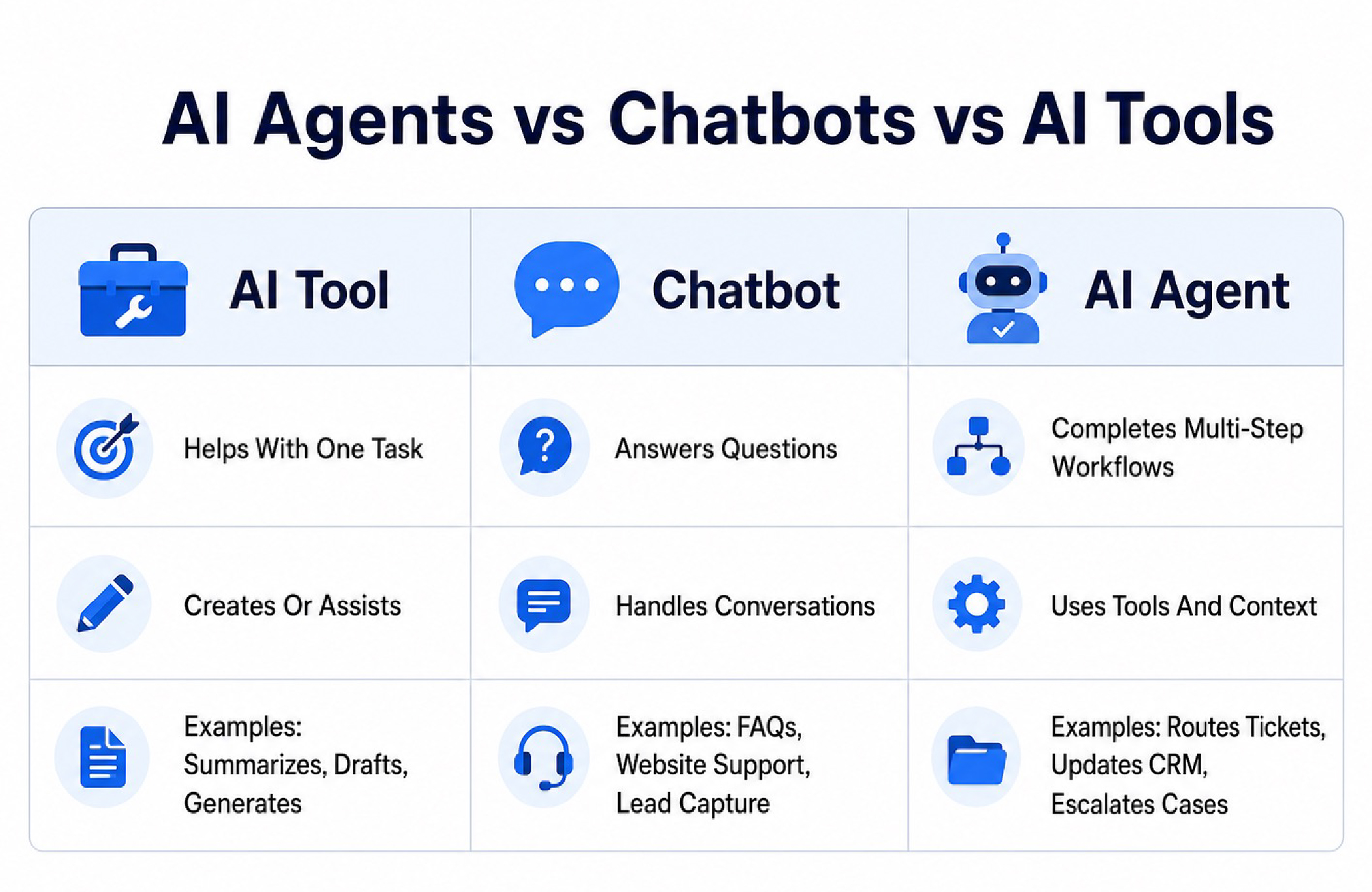
(This AI-assisted visual is for illustrative and educational purposes only. It simplifies the difference between AI tools, chatbots, and AI agents.)
How AI Agents Work In Business Workflows
AI agents usually follow a sequence that looks like this:
- Goal
- Context
- Data Retrieval
- Tool Use
- Action
- Review Or Escalation
A business gives the agent a goal, such as “classify new support tickets” or “summarize sales calls and update the CRM.” The agent then uses available context, such as internal documents, customer records, previous tickets, CRM notes, or product information. It may use approved tools, create an output, trigger an action, or send the task to a human reviewer.
The strongest agent workflows are not uncontrolled. They include permissions, review layers, and clear rules for what the agent can and cannot do.
Google Cloud’s Gemini Enterprise Agent Platform is positioned as a platform for developers to build, scale, govern, and optimize enterprise-ready agents across applications and workflows.
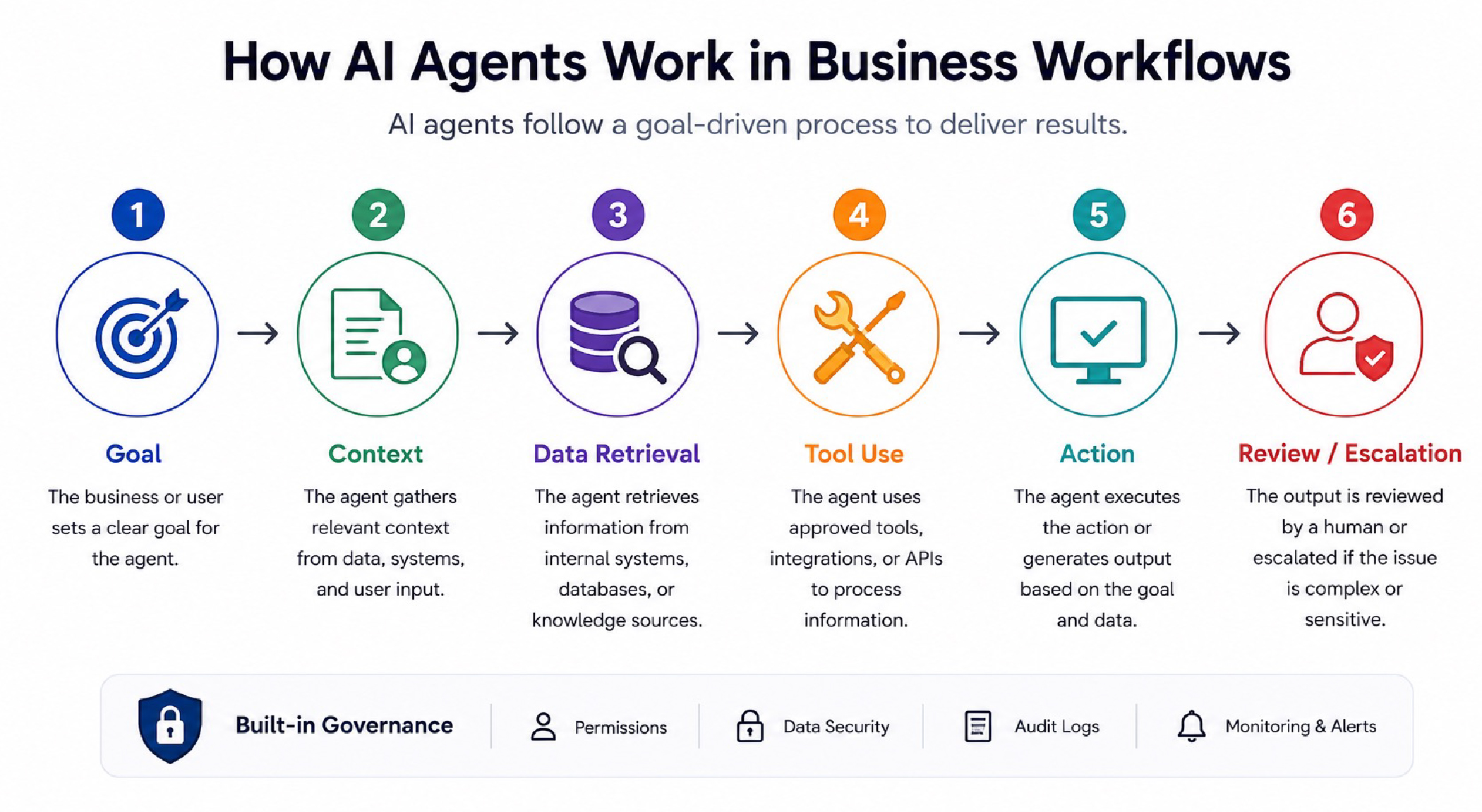
(This AI-assisted visual is for illustrative purposes only. Actual AI agent workflows may vary depending on tools, data access, permissions, and business systems.)
Common Business Use Cases For AI Agents
AI agents are most useful when a task includes repeated steps, multiple systems, and clear decision rules. They are less useful when the work requires deep human judgment, emotional nuance, or highly sensitive decisions without oversight.
AI Agents For Customer Support
Customer support is one of the most practical use cases for AI agents because support teams often deal with high-volume, repetitive requests.
AI agents can help with:
- Answering Common Questions
- Summarizing Customer Conversations
- Routing Tickets By Urgency
- Suggesting Replies
- Escalating Complex Cases
- Updating Support Records
For example, an agent can receive a support ticket, identify the issue type, check the customer’s account details, search internal help documentation, draft a response, and send the case to a human if the issue is sensitive or unusual.
This connects naturally with how AI is changing customer experience, especially as support teams try to improve response speed without losing quality.
AI Agents For Sales And Lead Management
Sales teams often lose time on qualification, follow-up, and CRM updates. AI agents can support those workflows by handling repetitive steps before a salesperson gets involved.
AI agents can help with:
- Lead Qualification
- CRM Updates
- Follow-Up Drafts
- Meeting Summaries
- Call Notes
- Deal Research
- Pipeline Alerts
A sales agent could review a new inbound lead, check company details, score the lead based on defined rules, draft a follow-up email, and notify the right sales rep. The human still owns the relationship. The agent reduces the admin work around it.
AI Agents For Operations And Reporting
Operations teams often spend hours collecting updates from different systems. AI agents can reduce that manual work by pulling data, summarizing changes, and flagging issues.
AI agents can help with:
- Weekly Reporting
- Workflow Monitoring
- Task Summaries
- Process Alerts
- Data Collection
- Internal Updates
For example, an operations agent could collect project updates from a task tool, summarize overdue items, identify blocked tasks, and prepare a weekly status report for managers.
AI Agents For Internal Knowledge
Many teams waste time searching across documents, chats, spreadsheets, and project tools. AI agents can act as internal knowledge assistants when they are connected to approved company information.
AI agents can help with:
- Searching Internal Documents
- Answering Policy Questions
- Summarizing Meeting Notes
- Finding Past Decisions
- Drafting Internal Briefs
- Supporting Onboarding
This is useful for growing teams because information often becomes scattered as companies add more tools and departments.
AI Agents For Marketing And Content Workflows
Marketing teams can use AI agents to support content operations, not just content generation.
AI agents can help with:
- Content Brief Creation
- Content Repurposing
- Campaign Research
- Draft Review
- SEO Checks
- Publishing Workflow Support
For example, an agent could take a webinar transcript, identify the strongest themes, draft a blog outline, suggest social post angles, and prepare a newsletter summary. A human editor would still check accuracy, tone, and final quality.
This is where generative AI content workflows and business agents begin to overlap.
AI Agents For Finance And Admin Tasks
Finance and admin teams can use agents for structured, repetitive work where rules are clear and human review is built in.
AI agents can help with:
- Invoice Data Extraction
- Expense Categorization
- Procurement Support
- Contract Summaries
- Payment Follow-Up Drafts
- Internal Policy Questions
These workflows need careful controls because financial and administrative data can be sensitive. AI can reduce manual work, but approvals and audit trails should stay in place.
Enterprise AI Agent Ecosystems Are Expanding
AI agents are also becoming part of larger enterprise software ecosystems. Salesforce expanded partnerships with OpenAI and Anthropic to bring their models into Agentforce 360, which Reuters described as a platform for creating, deploying, and managing AI agents across organizations.
This matters because many companies will not adopt agents as isolated products. They will adopt agents inside the platforms they already use for sales, service, commerce, analytics, finance, engineering, or internal operations. That makes integration, permissions, and governance just as important as model quality.
Benefits Of AI Agents For Businesses
AI agents can create real value when they are applied to the right workflow.
Faster Response Times
Agents can handle first-pass work quickly, especially in support, sales, and internal knowledge workflows. That helps teams reduce delays without adding more manual steps.
Less Manual Handoff
Many workflows slow down because information moves from one tool to another manually. Agents can reduce that friction by connecting systems and triggering the next step.
Better Workflow Consistency
Agents can follow the same rules every time. That helps with routing, summarizing, tagging, and reporting tasks where consistency matters.
Stronger Internal Search
Agents connected to approved internal knowledge can help employees find answers faster instead of digging through multiple tools.
Scalable Support
Agents can handle repetitive work at higher volume while human teams focus on complex, sensitive, or strategic issues.
Better Use Of Existing Tools
A strong agent does not replace every business system. It helps existing systems work together more smoothly.
AI Agent Readiness Checklist
Before deploying an AI agent, the business should be ready for the workflow. A strong readiness check reduces failed pilots and prevents teams from giving agents too much responsibility too early.
Check:
- Is The Workflow Documented?
- Is The Data Clean And Reliable?
- Are Permissions Clear?
- Is There A Human Review Point?
- Are Escalation Rules Defined?
- Is There A Rollback Plan?
- Can The Output Be Logged?
- Is There A Clear Success Metric?
If the workflow is unclear, the agent will not fix it. It will usually expose the weakness faster.
Risks And Governance Challenges
AI agents are powerful because they can take action. That is also what makes governance important.
The main risks include:
- Hallucinated Or Incorrect Outputs
- Unauthorized Tool Actions
- Poor Escalation Rules
- Sensitive Data Exposure
- Weak Audit Trails
- Over-Automation
- Unclear Accountability
The more an agent can do, the more control it needs. A content assistant who drafts headlines is low-risk. An agent that updates customer records, sends emails, or triggers refunds needs much stronger guardrails.
Google Cloud has added tool governance in AI agents, including ways for administrators to manage approved tools for developers using Vertex AI Agent Builder. OpenAI’s business data privacy guidance also matters because businesses need clarity around data ownership, training, and privacy before agents touch internal or customer information.
This is where AI data privacy becomes a core business issue, not just a legal detail.
Human-In-The-Loop AI Still Matters
The safest business agent workflows usually keep human review in the right places.
A strong setup might look like this:
- AI Summarizes, Human Decides
- AI Drafts, Human Approves
- AI Routes, Human Escalates
- AI Flags Issues, Human Reviews
- AI Suggests Actions, Human Confirms
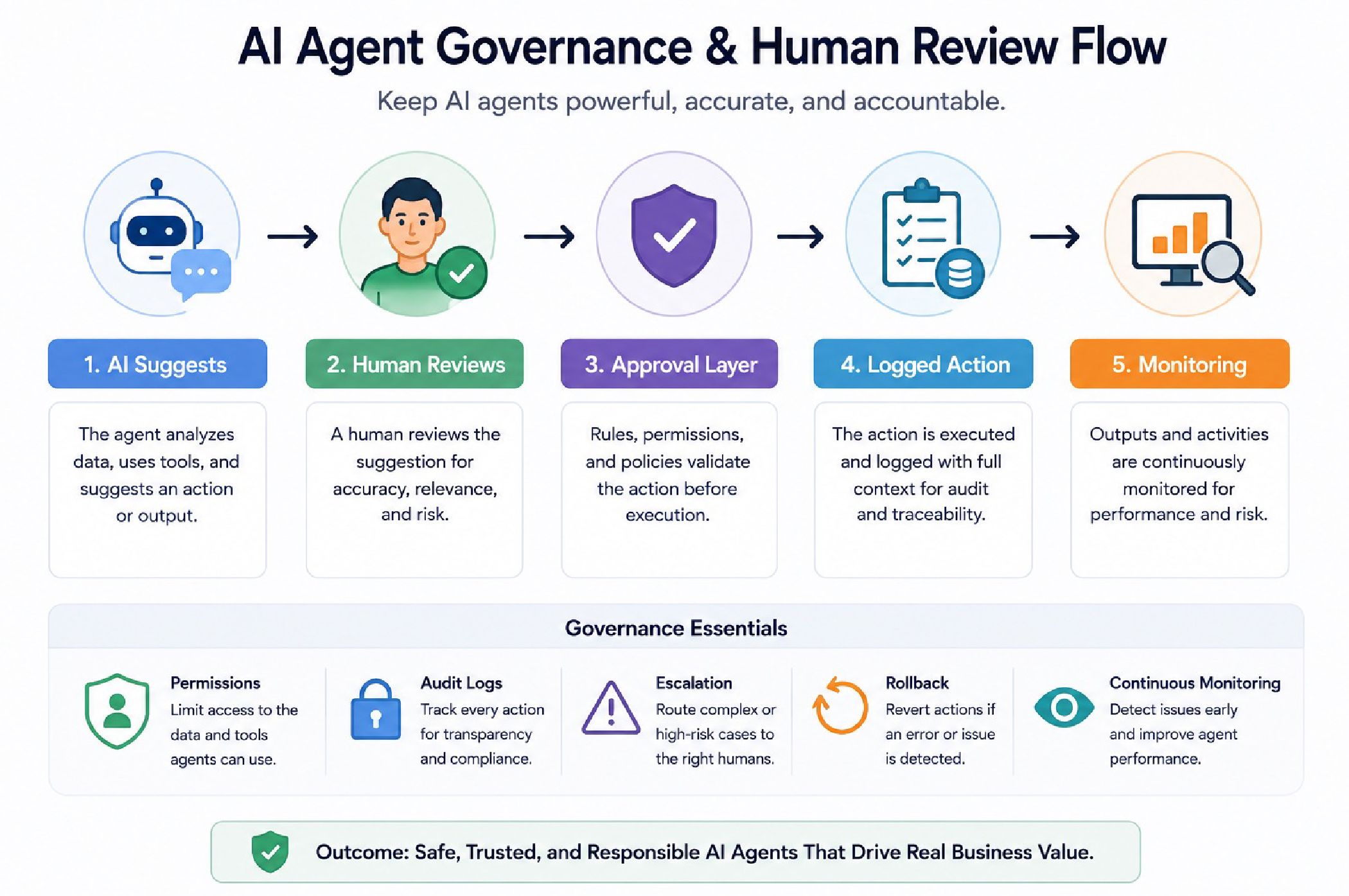
(This AI-assisted visual is for educational purposes only. Governance steps shown are simplified and should not be treated as legal, compliance, or security advice.)
Human review is especially important for customer complaints, legal content, financial decisions, hiring workflows, healthcare, compliance, and anything that could affect trust or safety.
AI agents should reduce low-value manual work. They should not remove accountability.
How To Start Using AI Agents Safely
Businesses do not need to start with a complex enterprise rollout. The best first agent workflow is usually small, measurable, and low-risk.
Step 1: Choose One Workflow
Start with one workflow that is repetitive and easy to evaluate.
Good examples include:
- Ticket Summaries
- Meeting Notes
- Internal FAQs
- Lead Routing
- Report Drafting
- Document Search
Step 2: Define What the Agent Can and Cannot Do
Set clear boundaries before launch.
Decide:
- What Data The Agent Can Access
- Which Tools It Can Use
- What Actions It Can Take
- When It Must Ask For Approval
- When It Must Escalate To A Human
Step 3: Run A Pilot
Test the agent with a small team or controlled workflow before expanding.
Measure:
- Time Saved
- Accuracy
- Escalation Quality
- User Adoption
- Error Rate
- Manual Work Reduced
Step 4: Add Governance
Before scaling, make sure there are logs, permissions, approval rules, and ownership. Someone should be responsible for monitoring performance and fixing issues.
Step 5: Scale Gradually
Once one workflow works, expand to related workflows. Do not launch several agents across the company without a proven pattern.
AI Agent Evaluation Checklist
Before choosing or deploying an AI agent, check:
- Does It Solve A Real Workflow Problem?
- Can It Access Only The Data It Needs?
- Are Tool Actions Governed?
- Is Human Review Built In?
- Can Outputs Be Logged And Audited?
- Can The Agent Be Disabled Or Rolled Back?
- Does It Integrate With Existing Tools?
- Can The Team Understand And Use It?
- Is There A Clear Success Metric?
- Does It Reduce Work Without Adding Risk?
AI Agents For Small Businesses vs Enterprises
AI agents can help both small businesses and enterprises, but the setup should look different.
Small Businesses
Small businesses usually need simple agents that save time quickly.
Good starting points include:
- FAQ Agents
- Appointment Support
- Lead Capture
- Email Drafting
- Basic Reporting
- Document Summaries
The priority is ease of use, affordability, and quick setup.
Mid-Market Teams
Mid-market teams usually need deeper integrations and better controls.
Useful agent workflows include:
- CRM Updates
- Sales Follow-Ups
- Support Routing
- Campaign Operations
- Internal Knowledge Search
- Reporting Workflows
The priority is connecting agents to existing systems without creating tool chaos.
Enterprises
Enterprises need governance, scale, and security from the beginning.
Useful agent workflows include:
- Employee Support
- Procurement Workflows
- Revenue Operations
- Compliance Support
- Engineering Assistance
- Security Operations
The priority is controlled deployment, identity, permissions, auditability, and vendor support.
Common Mistakes Businesses Make With AI Agents
Avoid these mistakes when adopting AI agents:
- Starting With Too Many Workflows
- Giving Agents Too Much Access Too Early
- Skipping Human Review
- Ignoring Data Privacy
- Forgetting Audit Logs
- Treating Agents Like Chatbots
- Measuring Activity Instead Of Impact
- Scaling Before The Pilot Works
- Not Training The Team
Most agent failures are not caused by the model alone. They happen because the workflow, data, governance, or adoption plan was weak.
FAQs About AI Agents In Business
What Is An AI Agent In Simple Terms?
An AI agent is an AI system that can work toward a goal by using context, tools, and actions. It can support multi-step workflows instead of only answering questions.
How Are AI Agents Different From Chatbots?
A chatbot mainly responds in conversation. An AI agent can use tools, retrieve information, take actions, and support a workflow.
Are AI Agents Safe For Business Use?
AI agents can be safe when they are deployed with the right permissions, human review, audit logs, and data controls. Higher-risk workflows need stronger governance.
What Business Tasks Can AI Agents Handle?
AI agents can support customer service, sales follow-ups, internal reporting, CRM updates, document search, onboarding, and basic admin workflows.
Do Small Businesses Need AI Agents?
Small businesses do not need complex agents right away, but simple agents can help with FAQs, lead capture, appointment support, email drafts, and repetitive admin tasks.
Will AI Agents Replace Employees?
AI agents are more useful as workflow assistants than full replacements. They can reduce repetitive work, but humans are still needed for judgment, relationships, strategy, and accountability.
Final Thoughts
AI agents are one of the most important business AI shifts in 2026 because they move AI from answering questions to supporting real workflows.
The businesses that benefit most will not be the ones that add agents everywhere. They will be the ones who choose the right workflows, keep humans in the loop, protect data, measure results, and scale carefully.
AI agents should make business operations faster, clearer, and easier to manage. If they create more confusion, they are being used the wrong way.





28 Responses
gulfarazahmed08@gmail.com
gulfarazahmed08@gmail.com
gulfarazahmed08@gmail.com
gulfarazahmed08@gmail.com
gulfarazahmed08@gmail.com
gulfarazahmed08@gmail.com
gulfarazahmed08@gmail.com
gulfarazahmed08@gmail.com
gulfarazahmed08@gmail.com
gulfarazahmed08@gmail.com
gulfarazahmed08@gmail.com
gulfarazahmed08@gmail.com
gulfarazahmed08@gmail.com
gulfarazahmed08@gmail.com
gulfarazahmed08@gmail.com
gulfarazahmed08@gmail.com
gulfarazahmed08@gmail.com
gulfarazahmed08@gmail.com
gulfarazahmed08@gmail.com
gulfarazahmed08@gmail.com
gulfarazahmed08@gmail.com
gulfarazahmed08@gmail.com
gulfarazahmed08@gmail.com
gulfarazahmed08@gmail.com
gulfarazahmed08@gmail.com
gulfarazahmed08@gmail.com
gulfarazahmed08@gmail.com
gulfarazahmed08@gmail.com