


Quick Takeaways
Zero Trust security is a cybersecurity model built on a simple rule: never automatically trust any user, device, app, or network request. Every access attempt should be verified before it reaches company systems or data.
In 2026, Zero Trust matters because businesses now work across cloud apps, remote teams, personal devices, SaaS tools, AI systems, and connected devices. A password alone is no longer enough to prove that someone should have access.
- Verify Every User, Device, And Access Request
- Use Least Privilege Access
- Add Multi-Factor Authentication
- Segment Systems And Data
- Monitor Activity Continuously
- Protect Cloud, Remote, And Internal Workflows
- Start Small Instead Of Rebuilding Everything At Once
Quick Answer: What Is Zero Trust Security?
Zero Trust security is a security approach where no user, device, app, or network is trusted by default. Every request to access company data or systems must be verified based on identity, device status, location, behavior, risk level, and access permissions.
NIST defines Zero Trust as a cybersecurity approach that moves defenses away from static, network-based perimeters and focuses on users, assets, and resources. The official NIST Zero Trust Architecture framework is still one of the strongest references for understanding how Zero Trust works.
Zero Trust is not one tool or one software purchase. It is a security approach that combines identity controls, device checks, access limits, monitoring, segmentation, and data protection.
In simple terms, Zero Trust means:
Do Not Trust Automatically. Verify Continuously. Give Access Only Where Needed.
This is why Zero Trust fits modern business security. It protects data in a setup where employees may access company systems from offices, homes, mobile devices, cloud apps, and third-party tools.
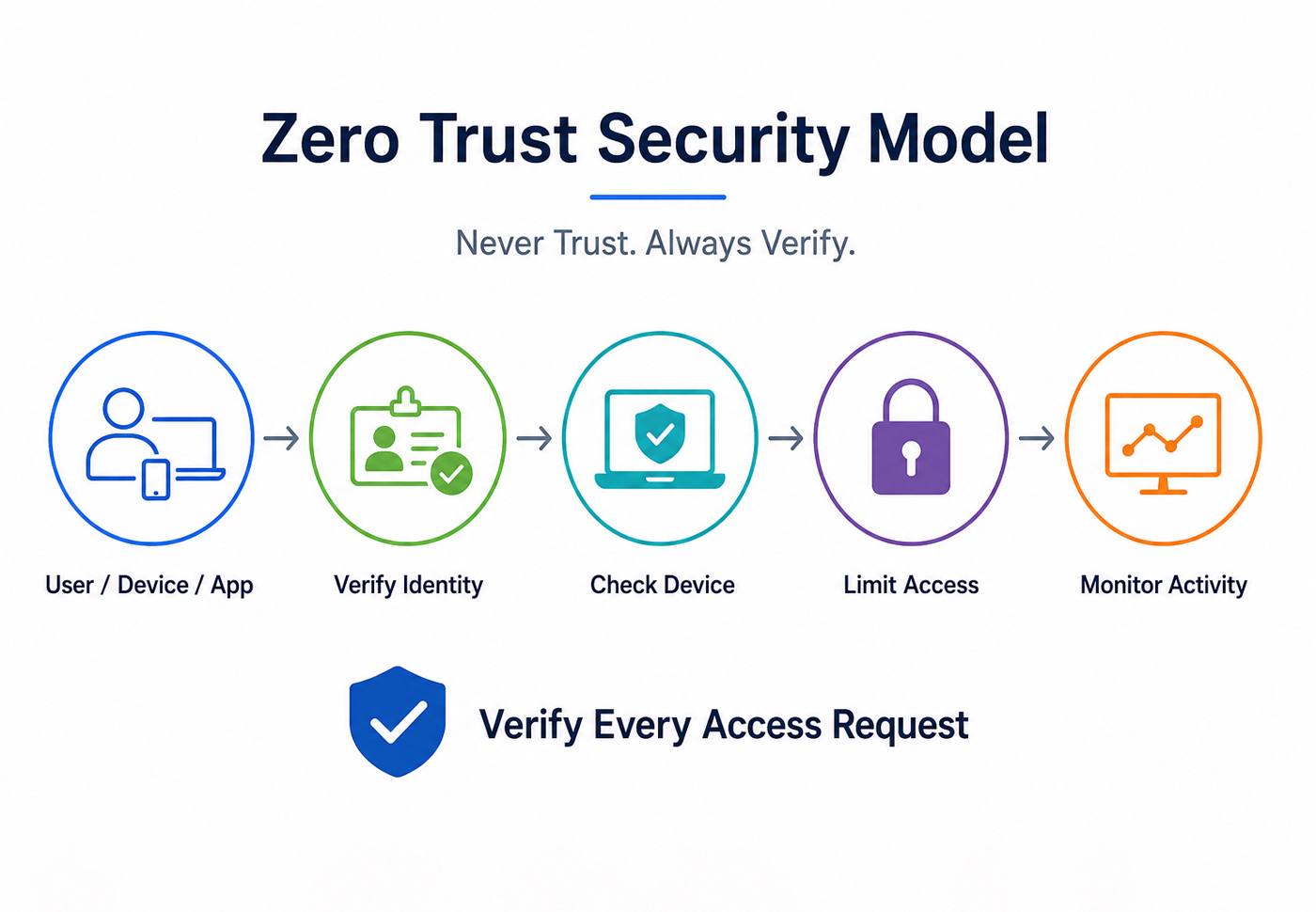
(AI-assisted infographic created for educational and illustrative purposes only.)
Why Zero Trust Matters More In 2026
Older security models were built around the idea of a company network perimeter. If someone was inside the network, they were often treated as more trusted. That model does not fit modern work anymore.
Businesses now depend on:
- Cloud Apps
- Remote Teams
- Mobile Devices
- SaaS Platforms
- Contractors And Third Parties
- AI Tools
- Connected Devices
- Hybrid Work Environments
Cybercriminals know this. Many attacks now target identities, stolen credentials, weak access controls, unmanaged devices, and cloud misconfigurations.
Microsoft’s Digital Defense Report 2025 found that 97% of identity attacks were password spray attacks, showing how often attackers still exploit weak or reused passwords. That makes Zero Trust especially relevant because it reduces dependence on passwords alone and adds stronger verification at each access point.
Zero Trust vs Traditional Security
Zero Trust does not mean a business has no trust at all. It means trust is earned through verification, context, and ongoing monitoring.
Traditional security often works like this:
- Trust The Internal Network
- Block Threats At The Perimeter
- Rely Heavily On Passwords
- Give Broad Access After Login
- Review Activity Later
Zero Trust works differently:
- Verify Every Access Request
- Check Identity And Device Health
- Limit Access By Role And Need
- Monitor Activity Continuously
- Assume Breach Is Possible
- Reduce Damage If An Account Is Compromised
The biggest difference is mindset. Traditional security asks, “Is this person inside the network?” Zero Trust asks, “Should this user, on this device, at this moment, access this specific resource?”
That question is much better suited to cloud, remote work, SaaS platforms, and modern business systems.
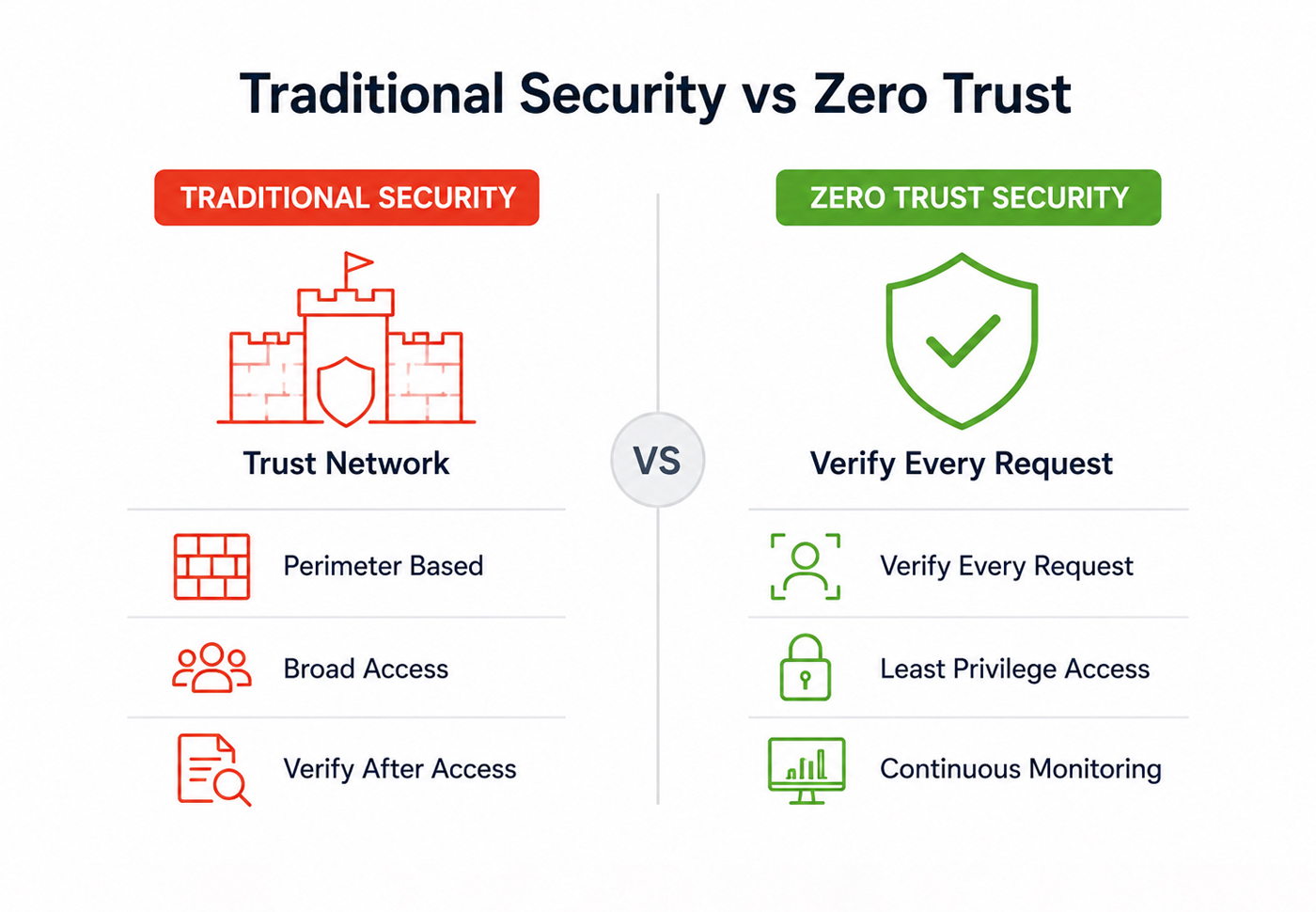
(AI-assisted comparison graphic designed to explain Zero Trust security concepts in a simplified format.)
1. Start With Identity And Access Control
Identity is the center of Zero Trust security. If attackers can steal or misuse an account, they can move through systems quietly.
Start by strengthening:
- User Accounts
- Admin Accounts
- Contractor Access
- Shared Accounts
- Service Accounts
- Third-Party Access
The goal is to know who is accessing what, why they need access, and whether that access should continue.
Strong identity controls include:
- Multi-Factor Authentication
- Single Sign-On
- Role-Based Access
- Conditional Access
- Strong Password Policies
- Admin Account Separation
- Regular Access Reviews
For small businesses, the first step is often simple: turn on multi-factor authentication for email, cloud storage, admin dashboards, CRM systems, accounting tools, and any app that stores sensitive information.
2. Use Multi-Factor Authentication Everywhere Possible
Multi-factor authentication, or MFA, adds another layer of protection beyond a password. Even if a password is stolen, attackers still need another verification method.
MFA should be used for:
- Email Accounts
- Cloud Storage
- Admin Dashboards
- Banking And Finance Tools
- CRM Platforms
- Website Admin Panels
- Remote Access Tools
- Security Tools
Not all MFA methods are equal. App-based authentication, hardware security keys, and phishing-resistant MFA are stronger than SMS codes. But any MFA is usually better than password-only access.
CISA’s Zero Trust Maturity Model gives organizations a structured way to improve Zero Trust maturity across five core pillars:
- Identity
- Devices
- Networks
- Applications And Workloads
- Data
These pillars help businesses look beyond passwords and think about access control across the full environment.
3. Apply Least Privilege Access
Least privilege means users should only have access to the systems and data they need for their work.
This reduces damage if an account is compromised. If a marketing employee’s account is stolen, attackers should not be able to access payroll, admin settings, server controls, or customer payment records.
Least privilege access includes:
- Role-Based Permissions
- Limited Admin Rights
- Temporary Access Where Needed
- Department-Based Access Rules
- Regular Permission Reviews
- Removal Of Old User Accounts
- Access Expiry For Contractors
A common business mistake is giving employees broad access “just in case.” That may feel convenient, but it creates unnecessary risk.
A stricter rule is:
Access Should Match The Job, Not The Person’s Seniority Or Convenience.
4. Verify Devices Before Granting Access
In Zero Trust, the device matters too.
A trusted user on an unsafe device can still create risk. A laptop with outdated software, no encryption, weak antivirus, or missing security patches should not have the same access as a managed and secure company device.
Device checks may include:
- Operating System Updates
- Antivirus Or Endpoint Protection
- Device Encryption
- Screen Lock Settings
- Security Patch Status
- Managed Device Status
- Jailbreak Or Root Detection
- Lost Or Stolen Device Controls
This matters for hybrid and remote teams. If employees use personal devices for work, the business should decide what data they can access and under what conditions.
Device trust is also useful for businesses reviewing remote work security risks because attackers often target weak home setups, personal devices, and unmanaged endpoints.
5. Segment Networks, Apps, And Data
Zero Trust also limits how far attackers can move if they get inside one account or system.
Segmentation means separating systems so that one compromised area does not expose everything.
Businesses can segment:
- Admin Systems
- Customer Data
- Finance Tools
- HR Files
- Internal Documents
- Development Environments
- Cloud Storage
- IoT Devices
- Guest Wi-Fi
For example, an employee who needs access to customer support tickets does not automatically need access to accounting files or server settings.
Segmentation is especially useful for companies with connected devices or IoT systems. A weakly connected device should not become a doorway into core business systems. This connects with lessons from major IoT security breaches, where connected devices can create hidden security gaps when they are not separated from sensitive systems.
6. Monitor Activity Continuously
Zero Trust is not a one-time login check. It depends on continuous monitoring.
Businesses should watch for:
- Unusual Login Locations
- Repeated Failed Login Attempts
- Large File Downloads
- New Admin Actions
- Access Outside Normal Hours
- Login From Unknown Devices
- Sudden Permission Changes
- Suspicious App Connections
This helps catch threats faster. A user may pass MFA at login, but later behavior can still become suspicious.
Continuous monitoring is especially useful when attackers use stolen credentials. The login may look valid, but the behavior may not match the real user.
For businesses already tracking top cybersecurity threats facing small businesses, monitoring identity and access behavior is one of the strongest ways to reduce risk.
7. Protect Data Based On Sensitivity
Zero Trust should protect data based on its value and risk level.
Not all data needs the same controls. A public blog draft is not the same as customer payment data, employee records, legal documents, or product source code.
Classify data into levels such as:
- Public
- Internal
- Confidential
- Restricted
- Regulated
Then match controls to the data level.
For sensitive data, use:
- Encryption
- Access Limits
- Download Restrictions
- Audit Logs
- Data Loss Prevention
- Approval Rules
- Secure Sharing Settings
The goal is to stop sensitive data from spreading across tools, inboxes, personal devices, and unapproved apps.
8. Use Conditional Access Rules
Conditional access means the system checks the context before granting access.
For example, access may depend on:
- User Role
- Device Health
- Location
- Login Risk
- Time Of Day
- App Sensitivity
- Data Type
- Behavior Pattern
A low-risk login from a managed device may be allowed normally. A login from a new country, an unknown device, or a risky network may require extra verification or be blocked.
This is where Zero Trust becomes practical. It does not treat every access request the same. It adjusts based on risk.
9. Secure Third-Party And Contractor Access
Vendors, freelancers, agencies, consultants, and software partners can create access risk if they are not managed carefully.
Third-party access should follow the same Zero Trust principles:
- Verify Identity
- Limit Access
- Use MFA
- Set Expiry Dates
- Review Permissions
- Remove Access After Work Ends
- Monitor Third-Party Activity
A contractor should not keep access months after a project ends. A vendor should not have broader permissions than the task requires.
Many breaches involve weak partner access, old accounts, or over-permissioned third-party tools. Zero Trust reduces that risk by treating every external connection carefully.
10. Build Zero Trust Into Cloud And SaaS Tools
Most businesses now use multiple cloud and SaaS platforms. That makes cloud access one of the most practical places to start Zero Trust.
Focus on:
- Email Security
- Cloud Storage Permissions
- CRM Access
- Accounting Tool Access
- Admin Dashboards
- Team Chat Tools
- Project Management Apps
- Marketing Platforms
For each tool, check:
- Who Has Access?
- Who Has Admin Rights?
- Is MFA Turned On?
- Are Old Users Removed?
- Are Shared Links Restricted?
- Are Sensitive Files Protected?
- Are Login Logs Reviewed?
Small businesses often have security gaps inside the apps they use every day. Zero Trust helps close those gaps without requiring a full enterprise rebuild.
11. Zero Trust For Small Businesses
Zero Trust can sound enterprise-heavy, but small businesses can start with practical steps.
A small business Zero Trust plan can begin with:
- Turn On MFA For Core Tools
- Remove Old User Accounts
- Limit Admin Access
- Use Password Managers
- Review Cloud File Sharing
- Keep Devices Updated
- Separate Guest Wi-Fi
- Back Up Critical Data
- Train Employees On Phishing
- Review Access Every Quarter
This is enough to reduce many common risks.
Small businesses do not need to buy every Zero Trust tool at once. The goal is to reduce blind trust step by step.
This also supports broader guidance on how small businesses can defend against 2026 cyber threats, especially as attackers target weak passwords, phishing, outdated software, and exposed cloud accounts.
12. Zero Trust And AI Security
AI tools add another reason to use Zero Trust.
Employees may now use AI assistants, browser extensions, automation tools, chatbots, and AI-powered apps that connect to business data. Without access rules, these tools can create data exposure risks.
Zero Trust helps by asking:
- Which AI Tools Are Approved?
- What Data Can They Access?
- Which Employees Can Use Them?
- Can Outputs Be Reviewed?
- Are Logs Available?
- Can Access Be Revoked Quickly?
This connects to AI-powered cybersecurity because AI is now part of both defense and risk. It also connects with AI governance because AI tools need approved access, data rules, human review, and clear ownership.
Zero Trust and AI governance work well together. One controls access. The other controls AI use.
13. Common Zero Trust Mistakes
Zero Trust can fail when businesses treat it as a product instead of a security approach.
Avoid these mistakes:
- Buying Tools Without A Clear Plan
- Thinking MFA Alone Equals Zero Trust
- Giving Too Many Users Admin Access
- Forgetting Contractors And Old Accounts
- Ignoring Device Security
- Leaving Cloud Files Public Or Over-Shared
- Not Monitoring Login Behavior
- Skipping Employee Training
- Trying To Rebuild Everything At Once
- Treating Zero Trust As A One-Time Project
Zero Trust is not a one switch. It is a gradual shift in how access, identity, devices, apps, and data are controlled.
14. How Businesses Can Start With Zero Trust
A practical Zero Trust rollout does not need to be complicated.
Start with this order:
Step 1: List Critical Systems
Identify the tools and data that matter most.
Examples:
- Cloud Storage
- Accounting Tools
- CRM
- Website Admin
- HR Files
- Customer Data
- Payment Systems
Step 2: Review Who Has Access
Check users, admins, contractors, shared accounts, and old accounts.
Remove access that is no longer needed.
Step 3: Turn On MFA
Start with email, admin dashboards, cloud storage, finance tools, and remote access.
Step 4: Limit Permissions
Give users only what they need. Reduce admin rights.
Step 5: Check Devices
Make sure work devices are updated, protected, encrypted, and monitored where possible.
Step 6: Monitor Activity
Watch for unusual logins, risky file sharing, repeated failed attempts, and privilege changes.
Step 7: Repeat Regularly
Review access, tools, devices, and risks every few months.
Zero Trust works best when it becomes a habit, not a one-time setup.
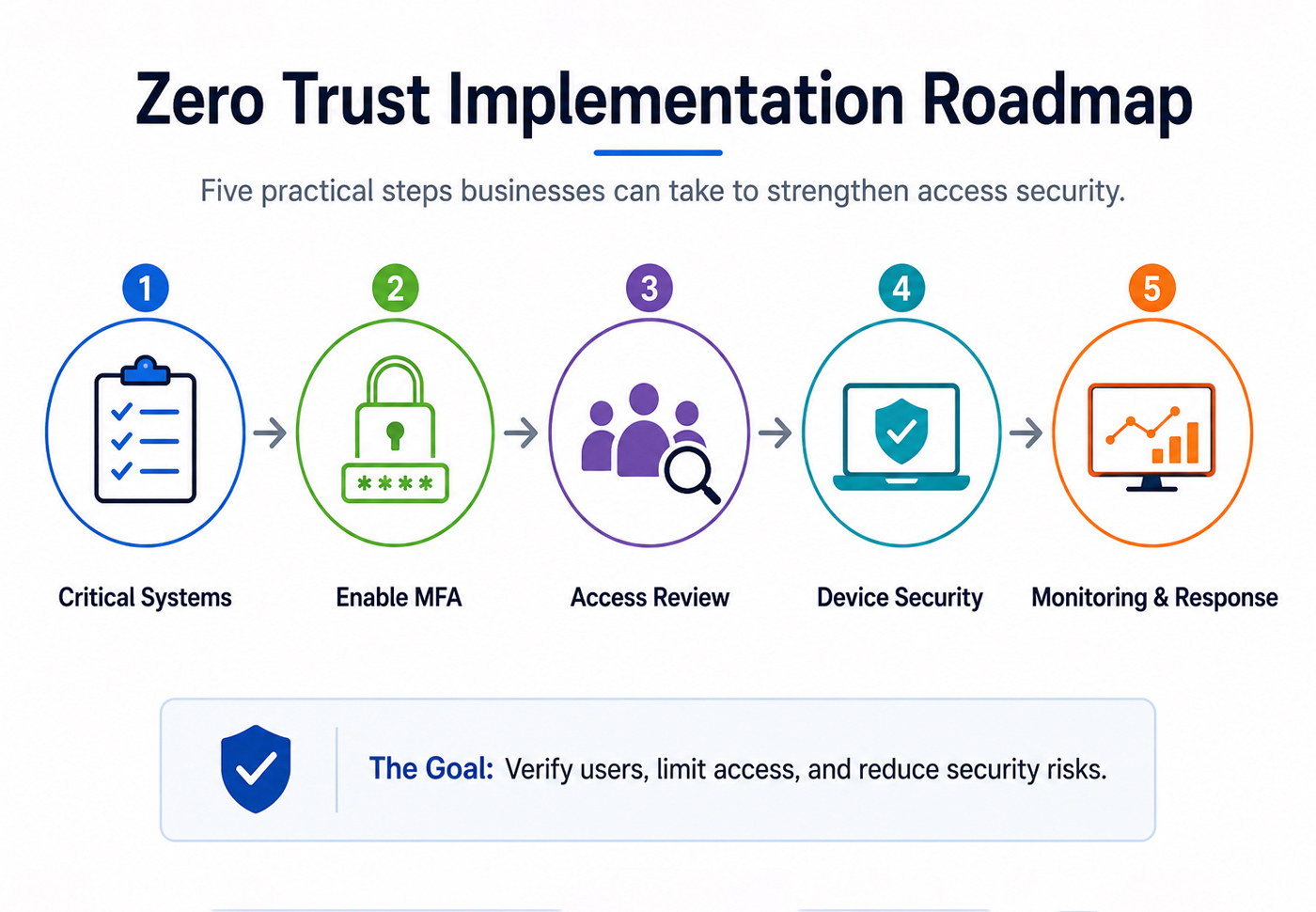
(AI-assisted visual showing a sample Zero Trust implementation roadmap for educational purposes only.)
Zero Trust Security Checklist For 2026
Before calling your business Zero Trust-ready, check:
- Is MFA Enabled On Core Business Tools?
- Are Old User Accounts Removed?
- Are Admin Rights Limited?
- Are Devices Updated And Protected?
- Are Sensitive Files Restricted?
- Are Cloud Sharing Settings Reviewed?
- Are Contractors Given Expiring Access?
- Are Suspicious Logins Monitored?
- Are AI Tools Approved Before Use?
- Is Access Reviewed Regularly?
- Are Employees Trained On Phishing And Account Security?
FAQs About Zero Trust Security
What Is Zero Trust Security In Simple Terms?
Zero Trust security means no user, device, or system is trusted automatically. Every access request must be verified before reaching company data or systems.
Does Zero Trust Mean Employees Are Not Trusted?
No. Zero Trust is not about distrusting employees. It is about protecting accounts, devices, systems, and data from misuse, compromise, or unnecessary exposure.
Is Zero Trust Only For Large Companies?
No. Small businesses can use Zero Trust principles too. MFA, least privilege access, device updates, cloud file controls, and regular access reviews are practical starting points.
Is MFA The Same As Zero Trust?
No. MFA is one part of Zero Trust, but Zero Trust also includes least privilege access, device checks, monitoring, segmentation, data controls, and regular reviews.
How Long Does Zero Trust Take To Implement?
It depends on business size and system complexity. Small businesses can start with basic identity and access controls within days or weeks. Larger organizations usually need a phased rollout.
What Is The First Step In Zero Trust?
The best first step is to identify critical systems and review who has access. After that, enable MFA and reduce unnecessary permissions.
Final Thoughts
Zero Trust security in 2026 is not about buying one tool or adding more friction to every login. It is about making access smarter, safer, and more controlled.
The core idea is simple:
- Verify Every Request
- Limit Access
- Monitor Behavior
- Protect Sensitive Data
- Review Permissions Often
Businesses that adopt Zero Trust gradually can reduce the damage from stolen credentials, weak devices, over-shared files, insider mistakes, and third-party access risks.
Cybersecurity threats are moving faster, but Zero Trust gives businesses a practical way to make it harder to break into and easier to protect.





4 Responses
gulfarazahmed08@gmail.com
gulfarazahmed08@gmail.com
I was looking for something on cyber security and it’s helpful. I have also written and posted an article.. see the link below..
http://www.a99solutions.com
greate artical